
Customer Experience, Industry, Stripe Terminal
Festival & Event Vendors: Stripe Terminal Best Practices for Card Payments
Aug
The best card payment setup for a festival vendor depends on one thing almost nobody tells you plainly: whether your reader can take a payment when the venue’s internet drops. Stripe Tap to Pay on a phone needs a live internet connection and cannot store a transaction offline, so in a dead zone it simply stops selling. A Bluetooth reader — the Stripe Reader M2 or BBPOS WisePad 3 — can queue payments offline and forward them when signal returns. And the cellular Stripe Reader S710 carries its own connection, so it stays online where venue WiFi doesn’t reach. For most festival stalls the right answer is the S710 for its own always-on cellular link, with a Bluetooth reader as the offline-capable budget fallback — and Tap to Pay only where you know signal is reliable. This guide gives you the decision matrix, the backup-hardware plan, and the receipt strategy that keeps the customer experience intact when there’s no printer in sight.
We build in-person payment and notification flows for events for a living. Where Stripe Terminal completes the transaction, FlowNotify completes the experience around it — the SMS or email receipt, the confirmation, the “thanks for stopping by” touch that a festival stall can’t do with a paper roll. So the recommendations below aren’t theoretical connectivity advice pulled from a spec sheet; they’re the setup we actually deploy for vendors working fields, fairgrounds, and car parks with unreliable signal. This is a cluster piece under the Stripe Terminal industry use-case pillar, and it pairs directly with our sibling guide on pop-up shop setup with Stripe Terminal — a pop-up hits the same connectivity and receipt problems a festival stall does.
What’s the best card payment setup for festival vendors?
The best setup is a reader that stays online independent of venue infrastructure — practically, the cellular Stripe Reader S710 — backed by an offline-capable Bluetooth reader and a digital receipt flow, so a single dead zone never costs you a sale.
Here’s the verdict before the detail. Festival connectivity is the whole game, and the three Stripe card-present surfaces handle it very differently. Tap to Pay turns a phone into a reader with zero hardware, but it requires an active internet connection and cannot process or store payments offline (Stripe Tap to Pay docs) — the moment the crowd saturates the cell tower or the field has no bars, the phone stops taking cards. A Bluetooth reader (Stripe Reader M2 or BBPOS WisePad 3) supports offline store-and-forward: it collects the payment at the point of sale and authorizes it once connectivity returns (Stripe offline payments docs). The cellular Stripe Reader S710 sidesteps the venue entirely — it has built-in cellular, so it’s online wherever there’s cell service (Stripe Reader S710).
For a vendor, that resolves to a simple rule: don’t bet your day’s takings on venue WiFi or a saturated cell tower and a phone that needs both. Carry a reader that either brings its own connection (S710) or can keep selling through an outage (Bluetooth, store-and-forward). Use Tap to Pay only as a supplementary tap when you know the signal is solid.
Can Stripe Terminal take payments without internet at a festival?
Partly — and the distinction decides which reader you should carry. Bluetooth Stripe readers can take card payments offline and forward them later; Tap to Pay on a phone cannot.
Stripe Terminal’s offline mode lets a supported Bluetooth reader keep collecting card payments with no network connection. The SDK stores the encrypted payment locally at the time of sale, and when internet access is restored it automatically forwards the queued transactions to Stripe for authorization (Stripe: collect card payments while offline). The Stripe Reader M2 and BBPOS WisePad 3 are the readers that support this. That’s what “offline” really means here — not that the money moves without a network, but that the sale is captured immediately and settled the moment you’re back online.
Tap to Pay is the opposite. Because it authenticates and authorizes through a live connection, it needs WiFi or cellular data on the spot and offers no local queue — no signal, no sale. Stripe is explicit that Tap to Pay requires an active internet connection. This is the single most consequential fact for a festival vendor, and it’s the one virtually every ranking “best festival payments” article skips: a phone-only setup in a dead zone doesn’t slow down, it stops.
There is a catch worth stating honestly, because platform-neutral advice is the whole point. Offline mode carries risk you accept knowingly: you’re authorizing after the fact, so a card that would have declined live can decline on forwarding, and Stripe imposes limits on offline transaction amounts and how long payments can stay queued. For low-ticket festival sales (food, drink, merch) that risk is usually small and worth it; for high-value items you should weigh it. The next section turns all of this into a single decision.
Tap to Pay vs Bluetooth reader vs S710: the festival connectivity decision matrix
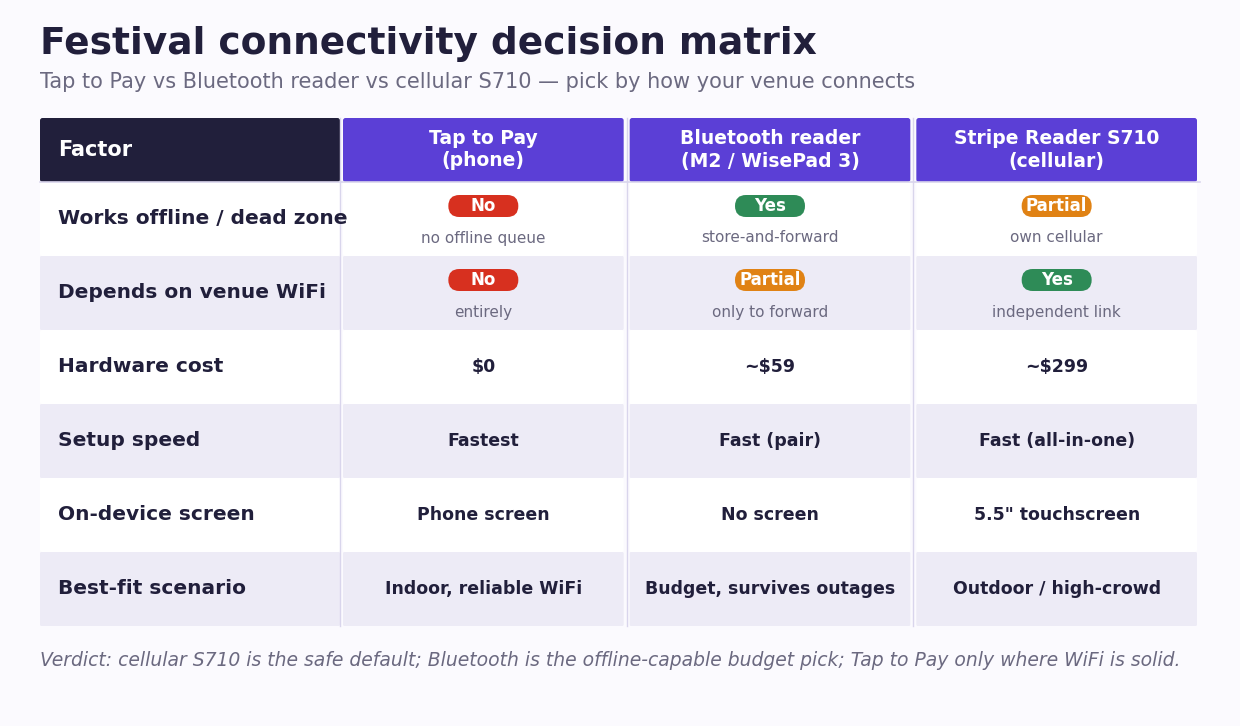
For most festival vendors the cellular S710 is the safest default, a Bluetooth reader is the offline-capable budget choice, and Tap to Pay is a good-signal-only supplement. Here is the trade-off in one table.
| Factor | Tap to Pay (phone) | Bluetooth reader (M2 / WisePad 3) | Stripe Reader S710 (cellular) |
|---|---|---|---|
| Works offline / in a dead zone | ❌ No — needs live internet, no offline queue | ✅ Yes — store-and-forward queues the sale | ⚠️ Brings own cellular; works anywhere with cell service |
| Depends on venue WiFi / your phone’s signal | ✅ Yes, entirely | Only to forward queued payments later | ❌ No — independent cellular link |
| Hardware cost | $0 (uses a phone you own) | ~$59 (M2 or WisePad 3) | ~$299 |
| Setup speed | Fastest — no device to pair | Fast — pair over Bluetooth to a phone/tablet | Fast — all-in-one, no host device needed |
| Customer-facing screen / on-device receipt | Phone screen | No screen (M2/WisePad 3 are handheld) | ✅ 5.5“ touchscreen |
| Best-fit festival scenario | Indoor venue with reliable WiFi; a light second till | Budget stall that must survive outages | Outdoor field, fairground, high-crowd — the safe default |
Read the matrix as a shopping decision. If your stall is indoors at a venue with dependable WiFi and you want a cheap second register for peak, Tap to Pay on a spare phone is fine. If you’re price-sensitive and mostly worried about brief outages, a Bluetooth WisePad 3 or M2 at ~$59 gives you offline store-and-forward for the cost of a tank of fuel. If you’re working an open field, a car-park market, or any high-density crowd that crushes the local cell tower, the S710 at ~$299 with its own cellular connection is the setup that keeps taking cards while everyone around you is stuck on “no signal.” (Hardware prices per Stripe Terminal devices; confirm the live S700/S710 figures on Stripe’s own pages, since regional pricing varies.)
The offline store-and-forward path — and its limits and risks
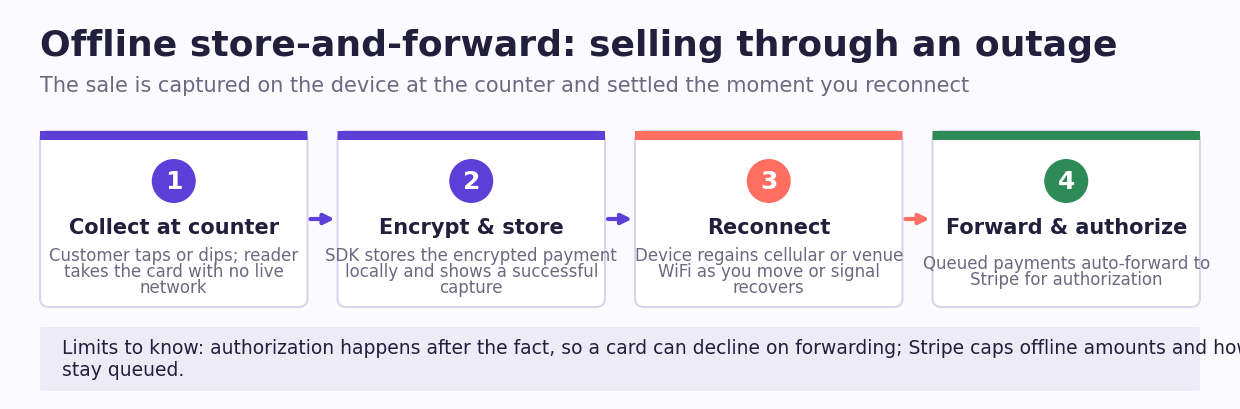
Offline store-and-forward is the festival vendor’s insurance policy, but it’s insurance with a deductible: know the limits before you rely on it.
When you enable offline mode on a Bluetooth reader, the flow is straightforward. The reader and SDK collect the card at the point of sale, encrypt and store the transaction on the device, and show your customer a successful capture. When the device reconnects — you walk to a spot with signal, or the venue WiFi recovers — the SDK forwards every queued payment to Stripe for authorization automatically (Stripe offline overview). You don’t babysit it.
The honest limits: because authorization happens later, a payment that would have declined in real time can decline on forwarding, and you’ve already handed over the goods. Stripe caps the value of individual offline transactions and the total amount you can hold offline, and queued payments must be forwarded within a defined window or they expire. For a food or merch stall selling low-ticket items, the exposure is minor and the upside — never turning a customer away during a five-minute outage — is large. For anything high-value, treat offline mode as a stopgap, not a business model, and reconnect as often as you can. Configure it deliberately before event day rather than discovering the limits mid-rush.
Backup hardware: what to pack so one dead zone doesn’t kill your day
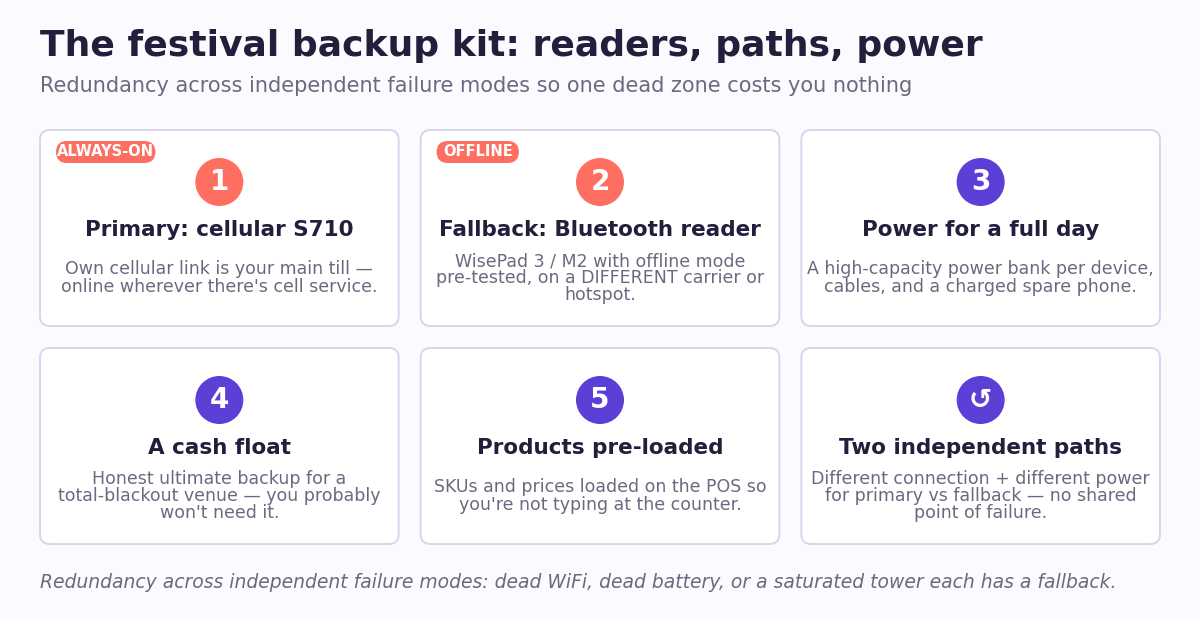
Pack a primary connected reader and one offline-capable fallback on a separate connection path, so no single point of failure — dead WiFi, a dead battery, a saturated tower — can stop you selling.
A resilient festival kit looks like this in practice:
- Primary: a cellular S710 (or a Bluetooth reader paired to a phone with a strong data plan). This is your always-on till.
- Fallback: a Bluetooth WisePad 3 or M2 with offline mode enabled and pre-tested. If your primary connection dies, this one keeps queuing sales. Crucially, put it on a different connectivity path than your primary — if the S710 is on one carrier’s cellular, run the Bluetooth reader off a phone on a different carrier or its own hotspot.
- Power for a full day: a high-capacity power bank per device, cables, and a charged spare phone. Readers that die at 3pm are as bad as readers with no signal.
- A cash float, honestly. Platform-neutral means admitting that in a genuine total-blackout venue, a small cash option is still the ultimate backup. Most vendors won’t need it if the reader mix above is in place — but pack it.
- Your product list and prices pre-loaded on whatever POS or app drives the reader, so you’re not typing SKUs at the counter while a line builds.
The principle is redundancy across independent failure modes: two readers, two connection paths, two power sources. A single dead zone should cost you nothing.
Sending receipts without a printer: the FlowNotify confirmation flow
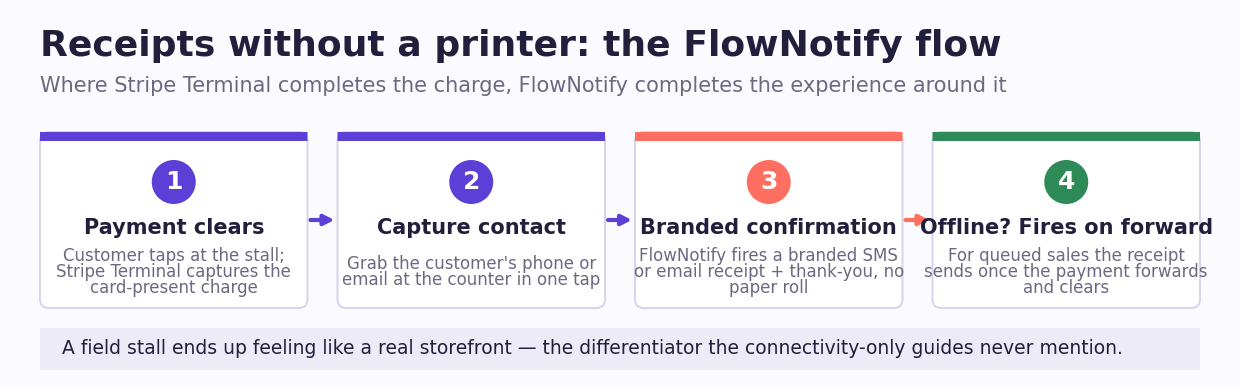
At a festival stall you almost never have a printer, so your receipt strategy is digital — an SMS or email confirmation fired the moment the payment clears, which is exactly the customer-experience layer FlowNotify is built for.
Stripe Terminal can email a receipt for a card-present charge, and that covers the compliance basics. But an event is a customer-experience moment, not just a transaction, and a bare Stripe receipt leaves value on the table. FlowNotify sits on top of the payment to send a branded SMS or email confirmation — a thank-you, a “here’s your receipt,” a link to your online store or next event, a donation acknowledgment for a fundraiser stall. Where Terminal completes the charge, FlowNotify completes the experience around it, with no printer, no paper, and no line held up while you fumble a receipt roll.
For offline sales the flow adapts cleanly: the confirmation fires when the queued payment forwards and clears, so the customer still gets their receipt shortly after — you capture the contact at the counter, FlowNotify sends the touch once you’re back online. That turns a field stall into something that feels like a real storefront, and it’s the differentiator the connectivity-only guides never mention. It’s the same receipt-and-confirmation pattern we detail for event registration desks with Jotform and Stripe Terminal.
FAQ: festival and event card payments
Can Stripe Terminal work without internet at a festival?
A Bluetooth Stripe reader (Stripe Reader M2 or BBPOS WisePad 3) can — it uses offline store-and-forward to capture the sale on the device and authorize it once connectivity returns (Stripe offline docs). Tap to Pay on a phone cannot: it requires a live internet connection and has no offline queue.
Does Tap to Pay work offline?
No. Stripe Tap to Pay requires an active internet connection (WiFi or cellular data) and cannot store transactions offline (Stripe Tap to Pay docs). In a festival dead zone a Tap to Pay phone will stop taking cards. Use a Bluetooth reader or the cellular S710 where signal is unreliable.
What card reader is best for outdoor events with no WiFi?
The cellular Stripe Reader S710, because its built-in cellular connection doesn’t depend on venue WiFi (Stripe Reader S710). If budget is tight, a Bluetooth WisePad 3 or M2 (~$59) with offline mode is the fallback — it keeps selling through outages and forwards the payments later.
How do festival vendors accept card payments?
They pair a Stripe Terminal reader (or Tap to Pay) with a POS or app that holds their product list, take a tap or chip payment at the counter, and send a digital receipt. The reader choice is driven by connectivity: cellular S710 for open venues, Bluetooth for offline resilience, Tap to Pay only where WiFi is reliable.
Can you take contactless payments at a market stall?
Yes — every Stripe Terminal reader accepts contactless (tap) cards and mobile wallets, as does Tap to Pay on a supported phone. The question isn’t whether contactless works, but whether your setup keeps working when the market’s signal drops; that’s what the reader matrix above solves.
Planning your festival or event payment setup? FlowNotify’s team runs these vendor flows — the reader mix, the offline plan, and the receipt-and-confirmation layer that makes a field stall feel like a storefront. Book an event consult and we’ll map the right Stripe Terminal setup to your venues and your connectivity risk.
