
Customer Experience, Industry, Stripe Terminal
Stripe Terminal for Donations: How Non-Profits Collect Card Gifts at Events
Aug
A non-profit collects donations with Stripe Terminal by taking a tapped or dipped card in person — Tap to Pay on a volunteer’s phone ($0 hardware) for roving collection, or a Stripe Reader S700 (staffed kiosk) or the cellular S710 (galas and outdoor venues with no WiFi) — at the discounted non-profit rate of 2.2% + 30¢ once your 501(c)(3) is verified, and then attaches donor identity as metadata to the payment so the gift reconciles to the right donor record and generates a tax-compliant receipt. That last clause is where almost every guide stops short. There is no shortage of content telling you “yes, you can take donations in person with Stripe” — Fundraise Up, GiveTap, Tithely, and Donorbox all say it. What none of them give away is the implementation layer: how to attach a donor to an in-person tap so it matches back to your CRM, how to automate the tax receipt, and how to pick event hardware around the one thing that actually breaks fundraising nights — venue connectivity. This guide is that layer, and it works with any CRM, not one vendor’s funnel.
We build in-person payment and notification flows for events for a living. Where Stripe Terminal completes the transaction, FlowNotify completes the experience around it — the donor’s receipt, the thank-you confirmation, the record that a fundraising night can’t produce from a card swipe alone. So the donor-matching walkthrough and hardware decisions below reflect flows we actually deploy at galas, festivals, and field fundraisers, not spec-sheet theory. This is a cluster piece under the Stripe Terminal by Industry pillar, and it pairs with our upcoming sibling guide on church and faith-org tap-to-pay giving — a passed-plate contactless collection hits the same donor-matching and receipt problems a gala does. Cite Stripe’s nonprofit resources and device pages for live figures throughout.
How do non-profits collect donations with Stripe Terminal?
Non-profits collect donations with Stripe Terminal by choosing an in-person reader path — Tap to Pay on a phone for volunteers, or an S700/S710 reader for staffed kiosks — capturing the card-present gift at the verified-nonprofit rate of 2.2% + 30¢, tagging the donor onto the payment so it lands on the right record, and sending an automatic tax-compliant receipt. Those four steps are the whole model; the rest of this guide is depth on the two that vendors won’t hand you free.
Here is the model before the detail. Stripe processes payments for verified 501(c)(3) organizations at a discounted 2.2% + 30¢ rate (versus the standard 2.9% + 30¢), per Stripe’s nonprofit page and charity payment-processing guide. Stripe Terminal is the in-person surface: a volunteer taps a donor’s contactless card or phone wallet on a Tap-to-Pay device, or a donor taps a staffed reader at a kiosk. Stripe’s own GiveTap customer story is the proof case — it “turns charity fundraisers’ phones into card readers with Stripe Terminal,” exactly the volunteer-phone model.
But taking the card is the easy 20%. The 80% that makes an in-person donation actually useful to a non-profit is:
- Donor-record matching — knowing who gave, not just that $50 came in, so it posts to the right CRM record.
- A tax-compliant receipt — the donor needs a written acknowledgment, and for gifts of $250+ the IRS requires a contemporaneous written acknowledgment with specific language.
- Reconciliation — matching a night of taps across several readers back to one campaign or fund.
The next sections walk each of those, because that is the ground no competitor covers at the raw-Terminal level.
Do you need a card reader, or is Tap to Pay enough for donations?
For most volunteer-driven collection you do not need a dedicated card reader at all — Tap to Pay on a phone ($0 hardware) is enough, and it is exactly the model Stripe showcases with GiveTap. You add a physical reader (S700 or S710) only when you want a staffed, donor-facing kiosk or when the venue’s connectivity forces the issue.
The split is straightforward:
- Tap to Pay on iPhone or Android ($0 hardware) is right for roving volunteers, a passed collection device, or any low-friction “tap here to give” moment. The card or phone wallet taps the volunteer’s own phone; the gift authorizes over the phone’s connection. Nothing to buy, nothing to carry, nothing to lose at the end of the night. Its one hard limit: it requires a live internet connection and cannot store a payment offline (Tap to Pay docs). In a saturated venue or a field with no bars, it stops.
- A dedicated reader — the Stripe Reader S700 (staffed smart reader with its own screen) or the cellular S710 — is right for a fixed, staffed donation kiosk where you want a durable, donor-facing device, or for a venue where connectivity is unreliable. Smart readers carry a $10 per-reader monthly Terminal service fee.
For a typical fundraising night, the answer is usually both: volunteer phones on Tap to Pay for roving asks, plus one or two staffed readers at the entrance or the pledge table. The deciding variable for the readers is almost always the venue — which is the next section.
Choosing event hardware: Tap to Pay vs S700 vs S710 with cellular for no-WiFi venues
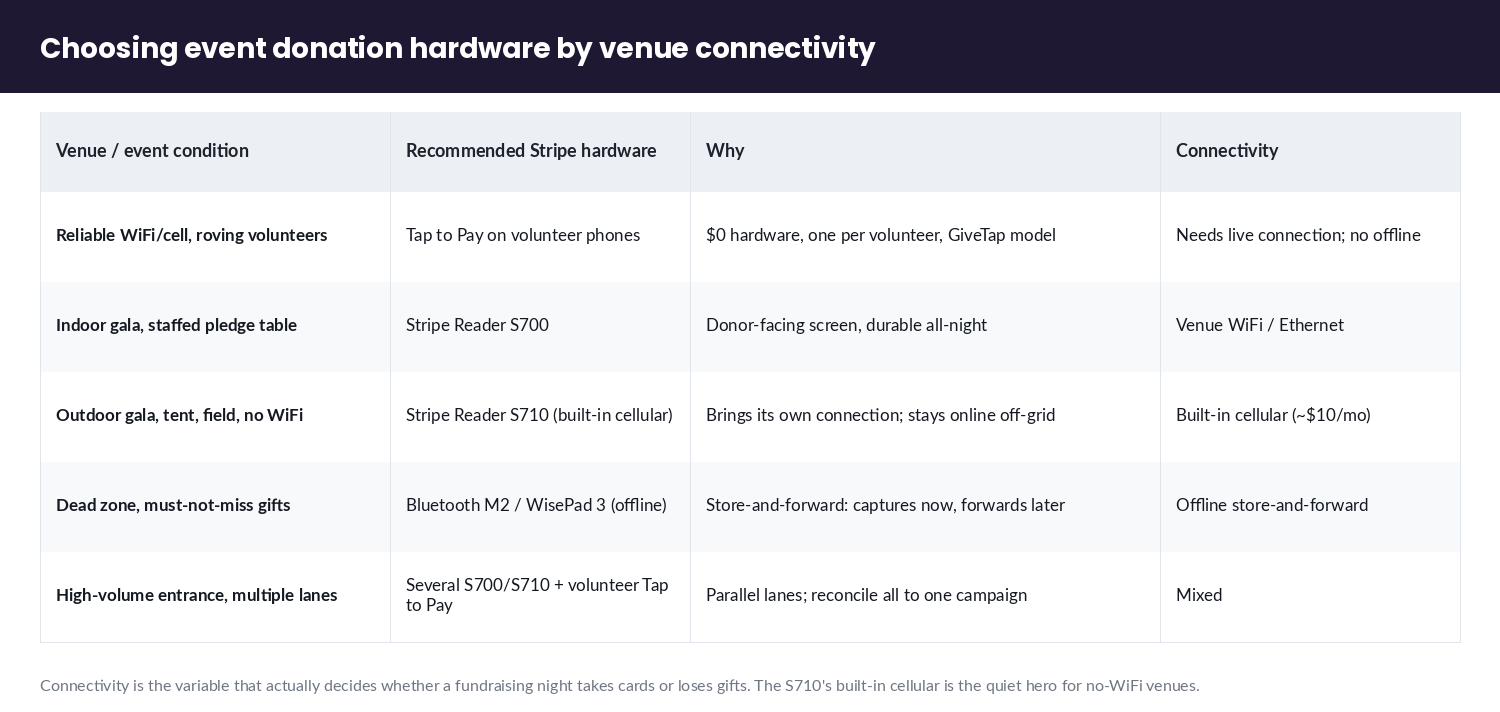
Choose your event hardware around venue connectivity: Tap to Pay where signal is reliable, the S700 for a staffed indoor kiosk on venue WiFi, and the cellular S710 for galas, tents, and outdoor venues where WiFi doesn’t reach — because the S710 carries its own cellular connection and stays online where nothing else does. Nobody frames the donation-hardware choice this way, and connectivity is the thing that actually decides whether a fundraising night takes cards or loses gifts.
| Venue / event condition | Recommended Stripe hardware | Why | Connectivity |
|---|---|---|---|
| Reliable WiFi/cell, roving volunteers | Tap to Pay on volunteer phones | $0 hardware, one per volunteer, GiveTap model | Needs live connection; no offline |
| Indoor gala/benefit, staffed pledge table | Stripe Reader S700 | Donor-facing screen, durable for all-night use | Venue WiFi / Ethernet |
| Outdoor gala, tent, field, no-WiFi venue | Stripe Reader S710 (built-in cellular) | Brings its own connection; stays online off-grid | Built-in cellular (~$10/mo when enabled) |
| Dead zone, must-not-miss gifts | Bluetooth M2 / WisePad 3 (offline mode) | Store-and-forward: captures the gift, forwards when signal returns | Offline store-and-forward |
| High-volume entrance, multiple lanes | Several S700/S710 + volunteer Tap to Pay | Parallel lanes; reconcile all to one campaign | Mixed |
The S710 is the quietly important one for non-profits. It is the S700 body plus built-in cellular (cellular is off by default and runs roughly $10/month when enabled), so it stays online at a marquee in a field, a golf course, or a parking-lot event where venue WiFi is a fantasy. Confirm live figures on Stripe’s S710 page and S700 page — third-party resellers routinely print inflated or region-specific numbers, so the first-party device pages are the only figures to trust. For a full reader-by-reader breakdown, see the 2026 Stripe Terminal reader guide.
One honesty note the vendors skip: if you genuinely cannot guarantee connectivity, a Bluetooth reader in offline mode (M2 or WisePad 3) will capture gifts and forward them when signal returns (offline payments docs) — at the accepted risk that a card which would decline live can decline on forwarding. For low-ticket donations that risk is usually small and worth it. Tap to Pay cannot do this; it is online-only.
Matching an in-person donation to the right donor record
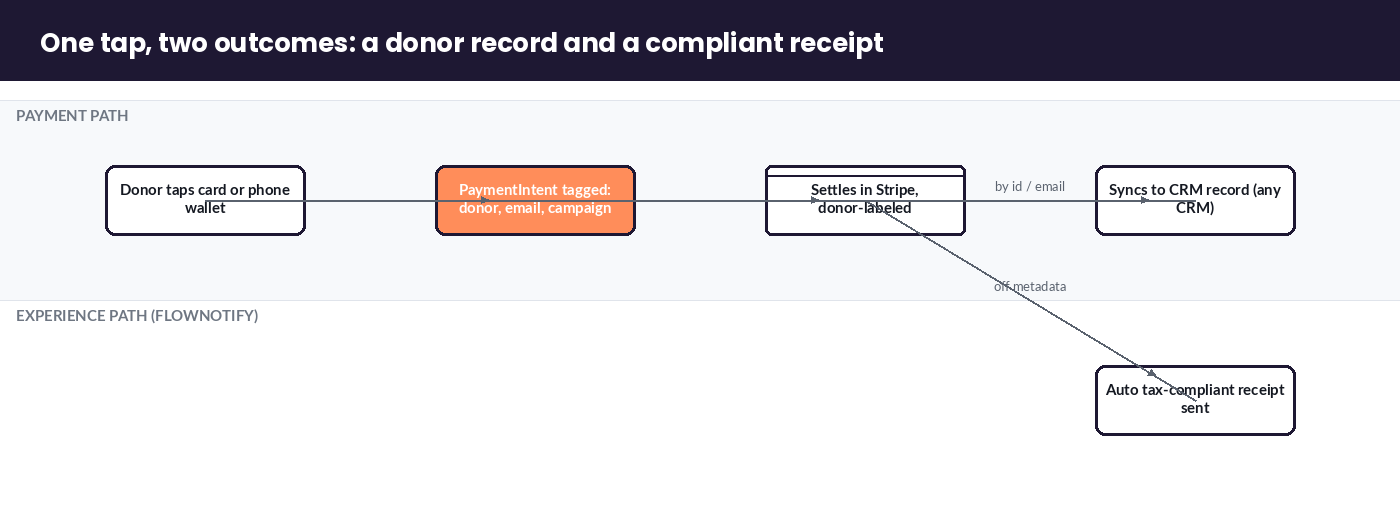
You match an in-person donation to a donor by attaching donor identity as metadata on the Stripe Terminal PaymentIntent at the moment of the tap — name, email, campaign, and a donor or CRM ID — so the gift arrives in Stripe already labeled and syncs to the right record in your CRM. This is the exact technique Fundraise Up hides behind a proprietary “Donation-ID” field, and there is no reason a non-profit can’t run it openly on raw Terminal with any CRM.
Here is the mechanics, as a repeatable procedure.
How to match a Stripe Terminal donation to a donor record:
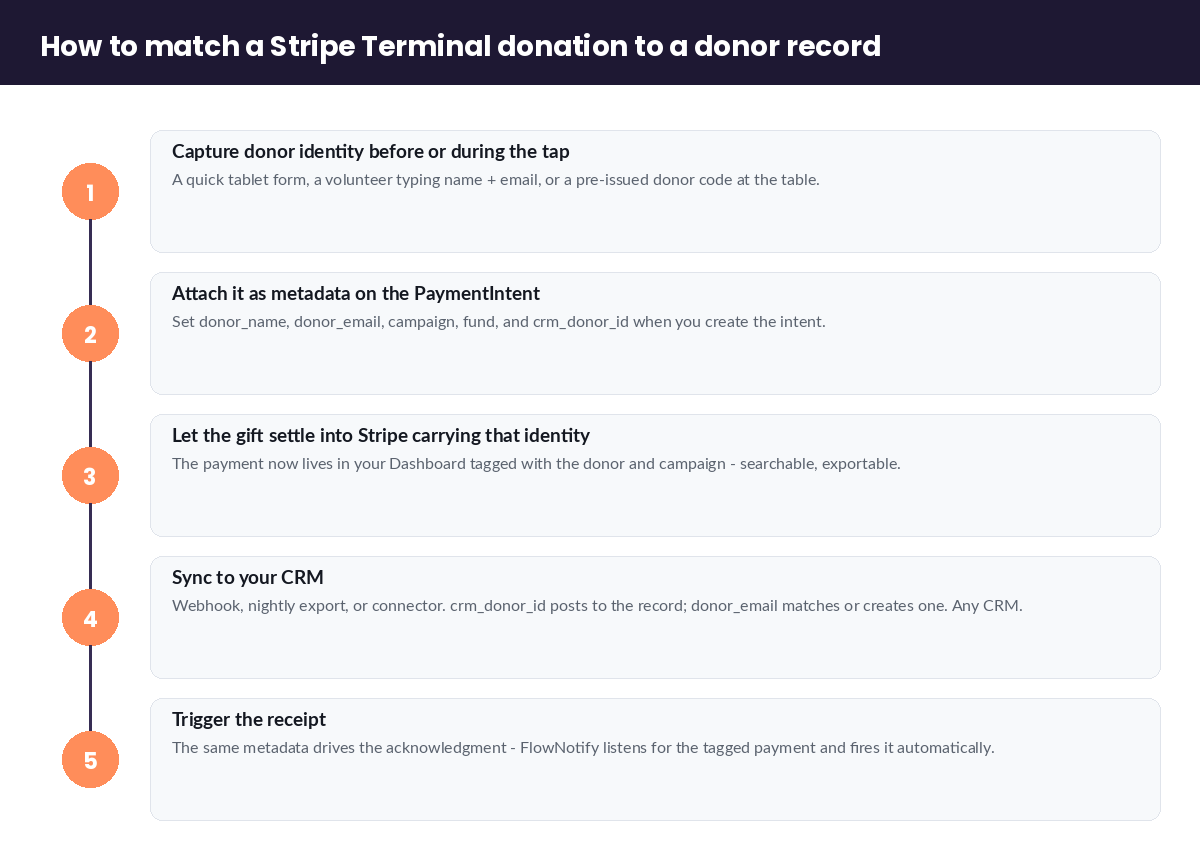
- Capture donor identity before or during the tap. A quick tablet form, a volunteer typing a name and email, or a pre-issued donor code at a gala table. Even just an email is enough to match or create a record later.
- Attach it as metadata to the PaymentIntent. Stripe Terminal payments are PaymentIntents, and every PaymentIntent accepts arbitrary
metadata. Set fields likedonor_name,donor_email,campaign,fund, and yourcrm_donor_idwhen you create the intent (Terminal docs). This is the single step that turns “$50 came in” into “$50 from Jane Doe for the Spring Appeal.” - Let the gift settle into Stripe carrying that identity. The payment now lives in your Stripe Dashboard tagged with the donor and campaign — searchable, filterable, exportable.
- Sync to your CRM. Via webhook, nightly export, or a CRM connector, push the tagged payment into your donor database. If the
crm_donor_idmatches an existing record, it posts to that donor; if not, thedonor_emailcreates or matches a new one. This works with any CRM — Salesforce NPSP, Bloomerang, Neon, HubSpot, a Google Sheet — because you control the identifier, not a vendor’s closed field. - Trigger the receipt. The same metadata drives the acknowledgment — see the next section. A notification layer like FlowNotify listens for the tagged payment and fires the donor’s receipt automatically.
The payoff: a fundraising night that ends with a clean, donor-attributed list in your CRM instead of a lump sum you spend the next week trying to un-anonymize. That is the operational difference between “we took cards” and “we grew our donor file.”
Sending tax-compliant donation receipts automatically
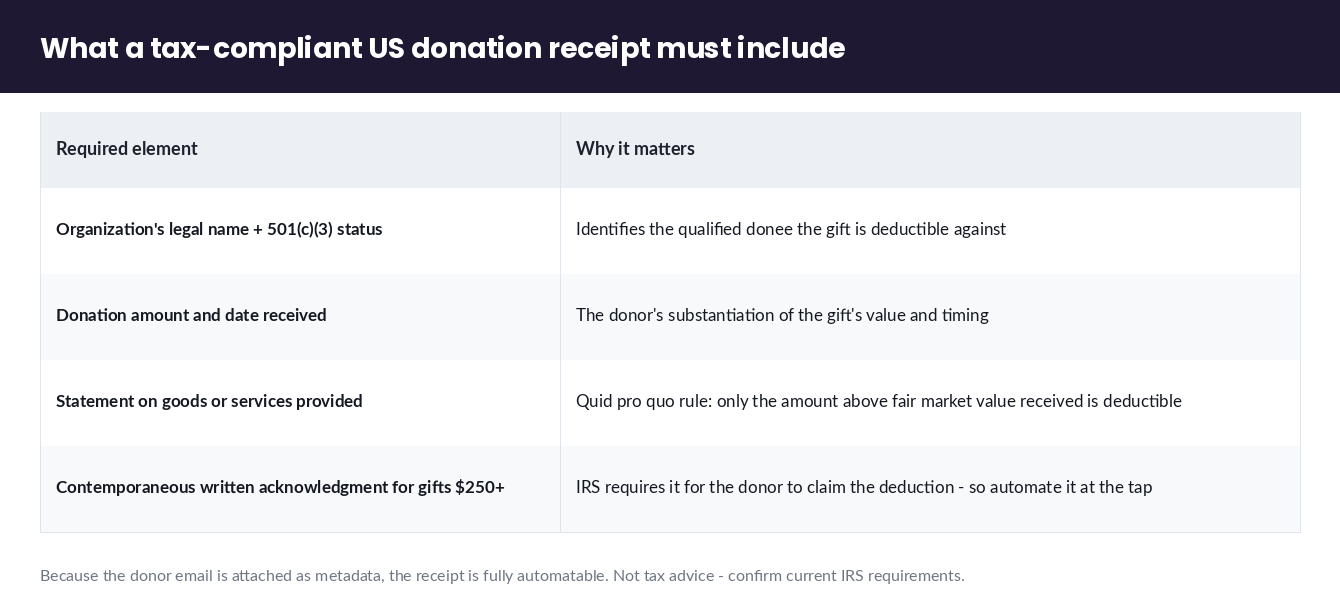
You automate donation receipts by triggering an emailed or texted acknowledgment off the tagged Stripe payment the moment it settles, with the language a US tax-deductible receipt requires: the organization’s name, the donation amount and date, confirmation of 501(c)(3) status, and — critically — a statement of whether any goods or services were provided in exchange. Stripe confirms receipts matter; it does not walk a non-profit through what a compliant one contains, so here it is.
A US donation receipt for a tax-deductible gift should include:
- The organization’s legal name and 501(c)(3) status.
- The donation amount (and date received).
- A statement about goods or services — either “no goods or services were provided in exchange for this contribution,” or, if something was (a gala dinner, an auction item), the fair market value of what the donor received, since only the excess is deductible. This is the quid pro quo rule, and it is the part event donations get wrong most often.
- For gifts of $250 or more, the IRS requires a contemporaneous written acknowledgment containing the above — so automating it at the point of the tap is not just convenience, it is compliance.
Because you attached the donor’s email as metadata (previous section), the receipt is fully automatable: the tagged payment settles, a notification flow reads the amount, donor email, and campaign, and sends a branded, compliant acknowledgment within seconds — before the donor has left the table. This is precisely the customer-experience layer flownotify.com/ exists for, and it is what a paper roll at a gala cannot do. Stripe’s guidance on accepting donations covers the payment side; the receipt content and the automation around it are what turn a compliant payment into a compliant gift.
Reconciling a multi-reader fundraising event to one campaign
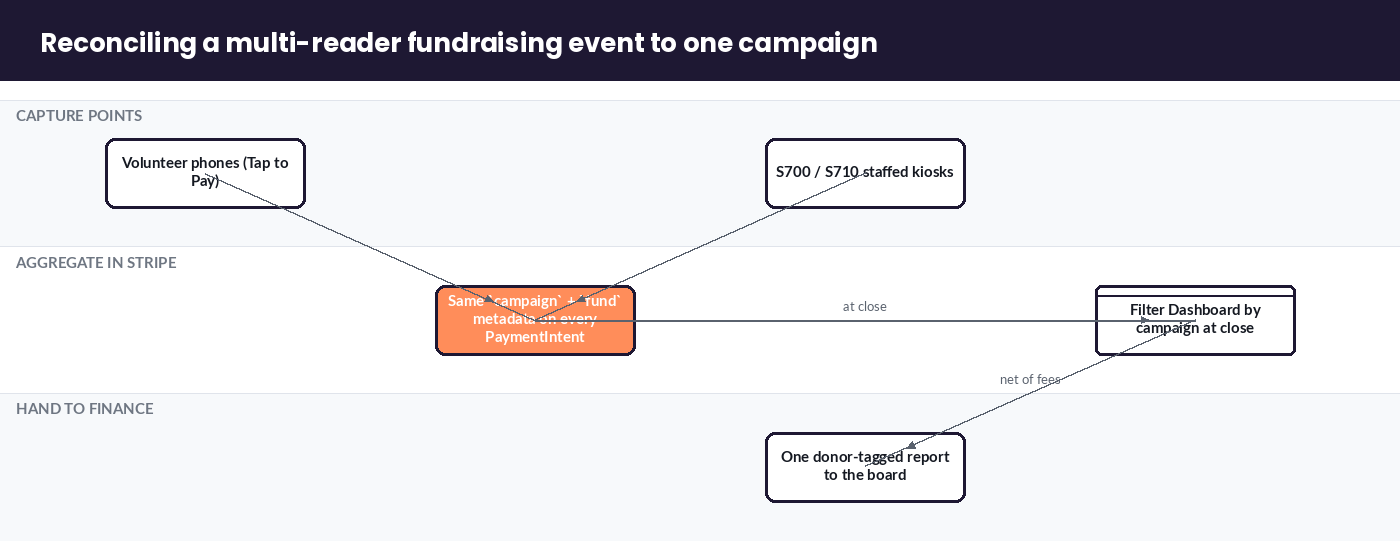
You reconcile a multi-reader event by tagging every reader’s payments with the same campaign metadata, then filtering the Stripe Dashboard by that campaign at the end of the night to get one total across all devices — volunteer phones and staffed kiosks alike. Deploying several readers at one event and rolling them all up to a single fund is an operations problem vendors gate behind their platforms, and it is one the notification/CX angle owns.
The habit, in practice:
- Tag consistently. Every device — every volunteer’s Tap to Pay phone, every S700/S710 kiosk — writes the same
campaignandfundvalues into each PaymentIntent’s metadata. Agree the exact strings before the event so nothing drifts. - Filter by campaign at close. In the Stripe Dashboard, filter by the campaign value and the event date. You now have every gift from every reader in one list, with donor tags intact.
- Reconcile the payout. Stripe batches the gifts into a payout; confirm the payout total matches the campaign total minus fees. Same discipline any treasurer already applies.
- Hand finance one report. Export the filtered, donor-tagged list. The board sees “Spring Gala: 214 gifts, $18,940, net of fees $18,470,” not five device statements to stitch together.
For a non-profit running this across many events a year, the capture-tag-receipt-reconcile loop is exactly the kind of flow we wire up so a development director gets a clean, donor-attributed report per event instead of a reconciliation headache.
Stripe Terminal donations FAQ
How do non-profits collect donations with Stripe Terminal?
Non-profits take in-person card gifts with Stripe Terminal using Tap to Pay on a volunteer’s phone ($0 hardware) or a Stripe Reader S700/S710 at a staffed kiosk, processed at the verified-nonprofit rate of 2.2% + 30¢. They attach donor identity as metadata to each payment so it matches to the right donor record in their CRM, and trigger an automatic tax-compliant receipt off that tagged payment.
What’s the Stripe nonprofit rate, and do I qualify?
Stripe processes payments for verified 501(c)(3) organizations at a discounted 2.2% + 30¢ per transaction, versus the standard 2.9% + 30¢. To qualify, your organization must be a registered 501(c)(3) and apply to Stripe for nonprofit pricing with your EIN and determination documentation; Stripe verifies the status before applying the discounted rate. Confirm current terms on Stripe’s nonprofit page.
Do I need a card reader, or can I use Tap to Pay on a phone for donations?
For most volunteer-driven collection, Tap to Pay on a phone is enough — no hardware needed, and it is the model Stripe showcases with GiveTap. Add a dedicated reader (S700, or the cellular S710 for no-WiFi venues) only when you want a staffed, donor-facing kiosk or when the venue’s connectivity is unreliable. Tap to Pay requires a live internet connection and cannot store gifts offline.
How do I send tax-compliant donation receipts from Stripe Terminal?
Trigger the receipt automatically off the tagged Stripe payment. Because you attached the donor’s email as metadata at the tap, a notification flow can send a branded acknowledgment within seconds. The receipt should include your organization’s legal name and 501(c)(3) status, the amount and date, and a statement of whether any goods or services were provided in exchange — required as a contemporaneous written acknowledgment for gifts of $250 or more.
How do I match an in-person donation to the right donor record?
Attach donor identity — name, email, campaign, and your CRM donor ID — as metadata on the Stripe Terminal PaymentIntent at the moment of the tap. The gift then settles into Stripe already labeled, and syncs to the matching record in your CRM by donor ID or email. This works with any CRM because you control the identifier, and it is the same technique platforms like Fundraise Up run behind a proprietary field.
Can Stripe Terminal take donations at an outdoor event with no WiFi?
Yes — use the cellular Stripe Reader S710, which has built-in cellular and stays online where venue WiFi doesn’t reach, or a Bluetooth reader (M2 / WisePad 3) in offline store-and-forward mode that captures gifts and forwards them when signal returns. Avoid a phone-only Tap to Pay setup at a no-signal venue, since Tap to Pay is online-only and cannot queue payments offline.
Planning a gala, festival, or field fundraiser and want the receipts and donor records to take care of themselves? We wire Stripe Terminal collection to automatic donor-matching and tax-compliant receipts so your team captures the gift and the donor in one tap. Book a non-profit consultation to map it to your CRM and your event — any CRM, any venue.
Processing rates, nonprofit eligibility, and hardware pricing cited here reflect Stripe’s published figures at the time of writing and should be confirmed against Stripe’s first-party nonprofit, device, and pricing pages. This is not tax advice — confirm receipt and acknowledgment requirements with your accountant or the current IRS guidance.
