
Customer Experience, Industry, Stripe Terminal
Tap to Pay Church Donations: How a Congregation Takes Contactless Giving Directly on Stripe
Aug
Yes, a church can accept Tap to Pay donations — a member taps a contactless card or phone wallet directly on a volunteer’s iPhone (XS or newer, iOS 16.4+) or NFC-capable Android phone (Android 11+) with no extra hardware, or on a Stripe Reader like the S700, and the gift processes at the discounted non-profit rate of 2.2% + 30¢ once your 501(c)(3) is verified with Stripe. That much every giving platform will tell you. What none of them hand you for free is the part that actually matters after the tap: how to attach a giver to a contactless donation so it posts to the right record in your church management system, how to produce a tax-compliant year-end contribution statement, and how to decide between passing a phone through the pews, a staffed lobby reader, and a fixed giving kiosk. This guide is that implementation layer, and it works whether or not you ever adopt a bundled giving platform.
We build in-person payment and notification flows for events and non-profits for a living. Where Stripe Terminal completes the transaction, FlowNotify completes the experience around it — the giver’s receipt, the thank-you confirmation, the record a passed-plate can’t produce on its own. So the donor-matching walkthrough and hardware decisions below reflect flows we actually deploy, not spec-sheet theory. This is a cluster piece under the Stripe Terminal by Industry pillar, and it is the faith-org sibling to our Stripe Terminal for event donations guide and our festival vendor payments guide — a passed collection device in a sanctuary hits the same donor-matching and receipt problems a gala or a festival booth does. Throughout, cite Stripe’s Tap to Pay overview, Tap to Pay on iPhone page, Terminal documentation, and nonprofit resources for live figures and device requirements.
Can a church accept Tap to Pay donations?
Yes — a church can accept Tap to Pay donations on a compatible phone with no extra hardware, or on a Stripe reader, at the verified-nonprofit rate of 2.2% + 30¢, and then attach the giver’s identity to the payment so it reconciles to the right record and generates a receipt. Those are the whole model; the rest of this guide is depth on the parts giving platforms keep proprietary.
Here is the model before the detail. A giver holds a contactless card, an Apple Pay or Google Pay wallet, or a smartwatch to the device. On Tap to Pay on iPhone, the device is an iPhone XS or later running iOS 16.4 or newer; on Tap to Pay on Android, it is an NFC-capable device on Android 11 or newer (Stripe Tap to Pay docs). No dongle, no dock, no reader to charge. Alternatively a Stripe Reader S700 sits at a staffed welcome desk, or a cellular S710 covers an outdoor or no-WiFi venue. Stripe processes payments for verified 501(c)(3) organizations at a discounted 2.2% + 30¢ rate versus the standard 2.9% + 30¢, per Stripe’s nonprofit page.
Taking the tap is the easy 20%. The 80% that makes contactless giving actually useful to a church is:
- Giver-record matching — knowing who gave, not just that $100 came in, so it posts to the right record in your church management system (ChMS).
- Tax-compliant receipts and year-end statements — givers need written acknowledgment, and for single gifts of $250 or more the IRS requires a contemporaneous written acknowledgment with specific language.
- The physical giving mechanic — pass the device through the pews, staff a lobby reader, or install a fixed kiosk. Each changes the setup.
The next sections walk each, because that is the ground the giving-platform blogs deliberately skip.
Should you run Stripe Terminal directly, or adopt a bundled giving platform?
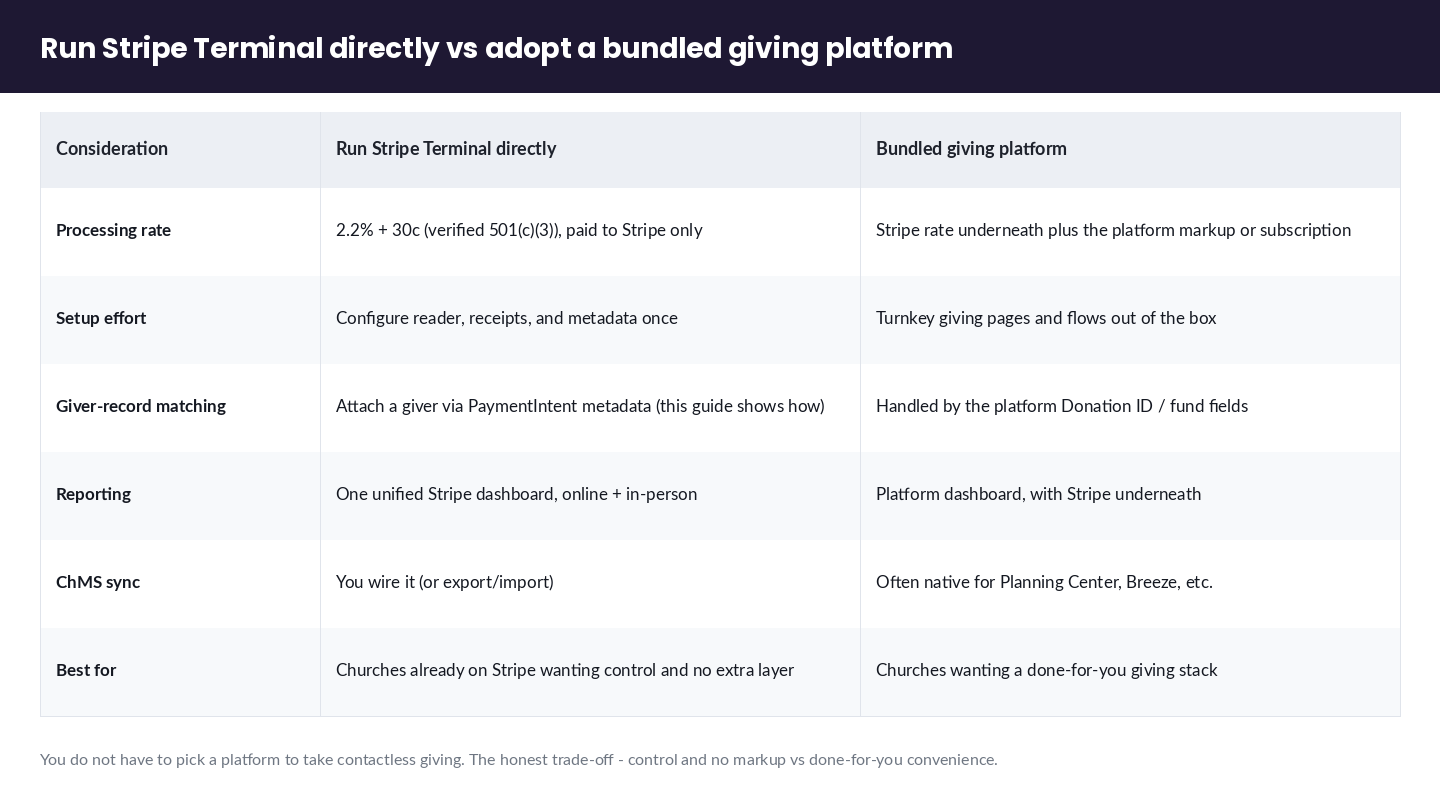
Run Stripe Terminal directly when you already use Stripe, want unified Stripe reporting, and don’t want to pay a platform layer on top of processing; adopt a bundled giving platform (Tithely, Givelify, Donorbox, Planning Center Giving) when you want giver-facing giving pages, pledge campaigns, and ChMS sync handled for you and are willing to pay for that convenience. This is the honest trade-off every giving-platform article avoids, because every one of them is selling the platform.
Here is the split, stated plainly:
| Consideration | Run Stripe Terminal directly | Bundled giving platform |
|---|---|---|
| Processing rate | 2.2% + 30¢ (verified 501(c)(3)), paid to Stripe only | Stripe rate underneath plus the platform’s markup or subscription |
| Setup effort | You configure the reader, receipts, and metadata once | Turnkey giving pages and flows out of the box |
| Giver-record matching | You attach a giver via PaymentIntent metadata (this guide shows how) | Handled by the platform’s “Donation ID” / fund fields |
| Reporting | One unified Stripe dashboard across online + in-person | Platform dashboard, with Stripe underneath |
| ChMS sync | You wire it (or export/import) | Often native for Planning Center, Breeze, etc. |
| Best for | Churches already on Stripe wanting control and no extra layer | Churches wanting a done-for-you giving stack |
The dishonest framing in the field is that you must pick a platform to take contactless giving. You don’t. If your church already processes online gifts through Stripe, or you value one reconciliation surface over a stack of vendor dashboards, running Terminal directly is a legitimate, often cheaper answer — and this guide is the only place that shows you how to do it properly. When a platform genuinely is the better fit — you want giver-managed recurring pledges and native Planning Center sync more than you want to avoid a markup — we’ll say so; the authority is in the honesty, not in a pitch.
Tap to Pay on a phone vs a Stripe reader vs a fixed giving kiosk: which fits your congregation?
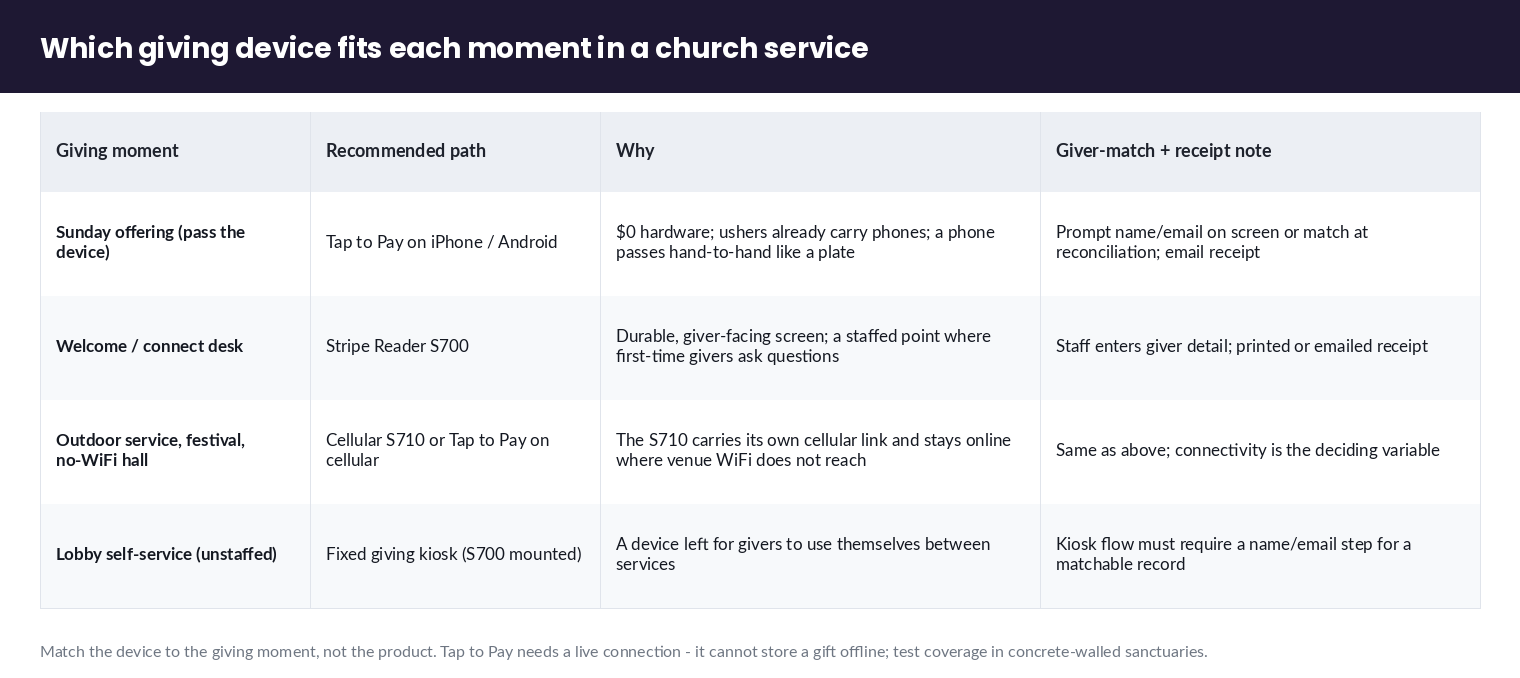
Match the device to the giving moment: Tap to Pay on a volunteer’s phone for the offering and roving asks (no hardware, no cost to carry), a staffed S700 at a welcome or connect desk, and a cellular S710 or a fixed kiosk for outdoor services, festivals, and no-WiFi halls. Nobody frames the faith-giving hardware choice around the moment rather than the product, and the moment is what actually decides it.
Use this decision matrix as your starting point:
| Giving moment | Recommended path | Why | Giver-matching + receipt note |
|---|---|---|---|
| Sunday offering (pass the device) | Tap to Pay on iPhone/Android | $0 hardware; ushers already carry phones; a phone passes hand-to-hand as easily as a plate | Prompt for name/email on the app screen, or map the giver at reconciliation; email receipt |
| Welcome / connect desk | Stripe Reader S700 | Durable, giver-facing screen; a fixed, staffed point where first-time givers ask questions | Staff enters giver detail; printed or emailed receipt |
| Outdoor service, festival, tent, no-WiFi hall | Cellular S710 or Tap to Pay on a phone with cellular data | The S710 carries its own cellular connection and stays online where venue WiFi doesn’t reach | Same as above; connectivity is the deciding variable |
| Lobby self-service (unstaffed) | Fixed giving kiosk (S700 mounted) | A device left for givers to use themselves between services | Kiosk flow should require a name/email step for a matchable record |
Two practical notes the vendor pages gloss over. First, Tap to Pay requires a live internet connection and cannot store a payment offline (Tap to Pay docs) — in a concrete-walled sanctuary with dead cell signal, test coverage before you rely on passing a phone. Second, smart readers like the S700/S710 carry a per-reader monthly Terminal service fee, so a church running one staffed reader plus volunteer phones keeps hardware cost minimal. Confirm current device pricing and connectivity specs on Stripe’s own S700, S710, and Terminal devices pages rather than reseller listings, which have carried conflicting figures.
How do I set suggested giving amounts and pass the reader during the offering?
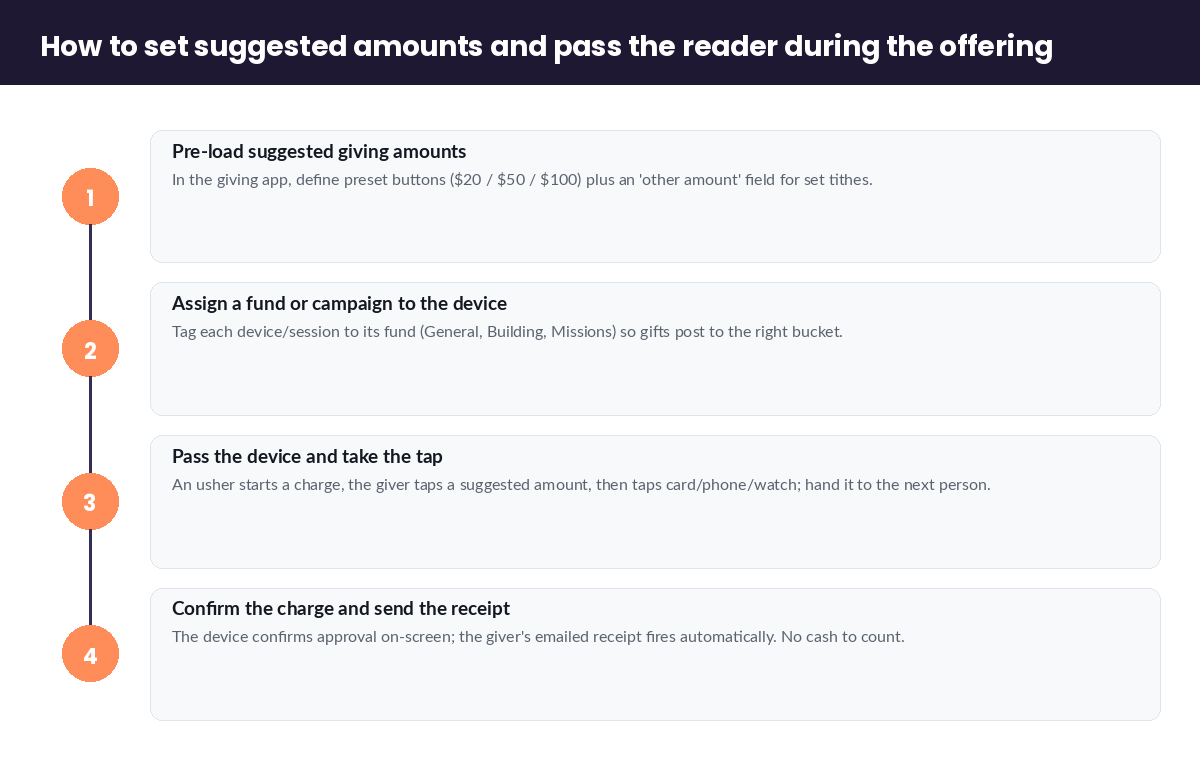
Set suggested giving amounts by configuring preset tender or “quick amount” buttons in your Terminal-connected app so a giver taps a suggested figure (say $20 / $50 / $100 / other) before presenting their card, and pass the device the same way you pass a plate — hand-to-hand down the pew, each giver tapping their card or phone to the volunteer’s device. The physical mechanic is the part givers actually experience, and it is barely documented anywhere.
A workable offering flow looks like this:
- Pre-load suggested amounts. In the giving app driving the reader or Tap to Pay device, define preset amount buttons plus an “other amount” field. Presets lower friction and gently raise average gift size; the “other” field respects givers who tithe a specific figure.
- Assign a fund or campaign. Tag each device or session to the fund it’s collecting for (General, Building, Missions) so gifts post to the right bucket — this rides on the same metadata used for giver-matching below.
- Pass the device. An usher starts a new charge, the giver taps a suggested amount, then taps their card/phone/watch to the device. The charge authorizes, the usher hands the device to the next person. A phone passes as naturally as a plate; an S700’s screen makes a staffed line just as smooth.
- Confirm and receipt. The device confirms approval on-screen; the giver’s receipt sends by email (see receipts below). No cash to count, no envelope to reconcile.
For self-service, mount an S700 as a lobby kiosk with the same presets and a required name/email step so unstaffed gifts stay matchable. The choice between passing a device and a fixed kiosk is not about which is “better” — it’s about whether your giving happens in the seats (pass a phone) or at a point (staff or mount a reader).
How do I match each tap-to-give donation to a giver record?
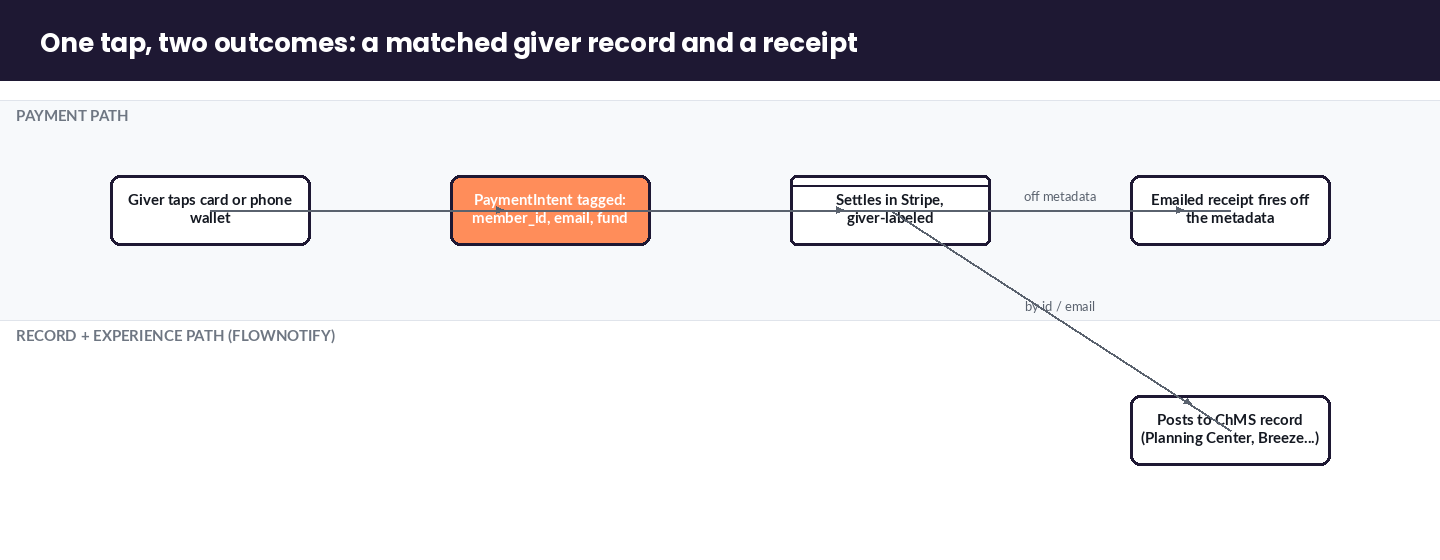
Match each tap to a giver by attaching giver identity to the Stripe PaymentIntent as metadata at the moment of the charge — a donor_id, member_id, name, email, or fund — so the gift carries the record it belongs to and reconciles into your ChMS instead of landing as an anonymous $50. This is the exact technique giving platforms hide behind a “Donation ID” field, and doing it directly is entirely supported.
Stripe’s Terminal payment flow creates a PaymentIntent for each in-person charge, and every PaymentIntent accepts a metadata object of arbitrary key–value pairs. That metadata is where giver identity lives. In practice you have three ways to capture it:
- Prompt at the device. The giving app collects a name and email (or a member lookup) before the charge, and writes them into the PaymentIntent metadata. Best for staffed desks and kiosks.
- Pre-assign the session. For a known giver at a connect desk, staff select the member first; the app stamps that
member_idonto every charge in the session. - Match at reconciliation. For fully anonymous roving collection, you capture email at minimum and match to ChMS records after the service via email.
Once the metadata is on the payment, reconciliation is deterministic: filter the Stripe dashboard or export by fund and date, read the member_id/email off each charge, and post to the matching ChMS record — Planning Center, Breeze, ChurchTrac, or a spreadsheet. Stripe’s own Planning Center customer story is the proof case that faith organizations run real giving on Stripe underneath. The difference here is you own the metadata schema, so your records are as rich as you make them — not limited to one vendor’s fixed fields. This is the notification-and-record credibility FlowNotify is built on: a card tap becomes a named, receipted, reconciled gift.
Are card-reader donations to a church tax-deductible, and how do givers get a receipt?
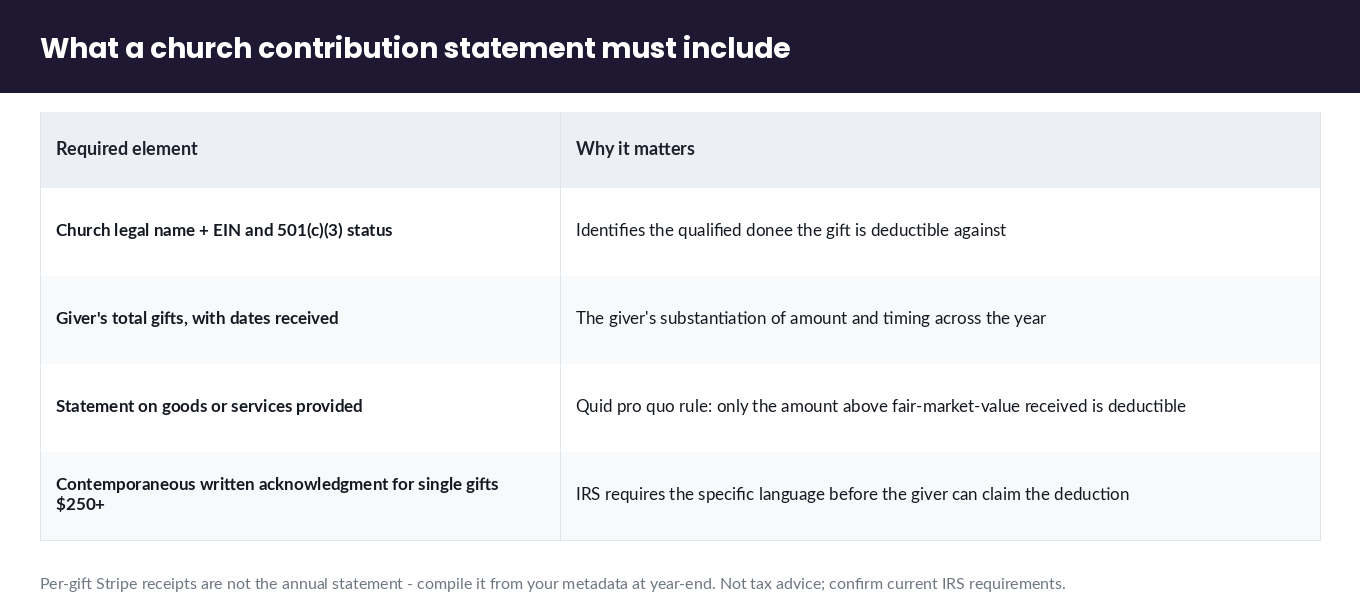
Gifts to a verified 501(c)(3) church are tax-deductible for the giver, and Stripe can email an automatic receipt for every charge — but that receipt is off by default and is enabled in the Stripe dashboard, and it is not by itself the IRS contribution statement a giver needs for gifts of $250 or more. Getting this right is a concrete gap in every giving-platform article, which assumes their platform handles it invisibly.
Do these three things:
- Turn on Stripe email receipts. In the Stripe dashboard under Settings → Business → Branding and the customer-emails settings, enable emailed receipts and brand them with the church’s name and logo. Now every tap sends the giver an immediate acknowledgment of the individual gift.
- Capture the giver’s email at the tap. A receipt needs somewhere to go. This is the same email you use for giver-matching above — one field, two jobs.
- Produce a year-end contribution statement separately. A per-transaction Stripe receipt is not an annual giving statement. At year-end, export all gifts by giver from Stripe (using your metadata), sum them per giver, and issue a formal contribution statement that includes the church’s name and EIN, the giver’s total, the dates, and the required IRS language — for single gifts of $250+, that a contemporaneous written acknowledgment was provided and whether any goods or services were received in exchange. This is where your metadata discipline pays off: clean
member_id/email tagging turns a year’s worth of taps into an accurate statement in minutes. Many churches generate the statement inside their ChMS after importing the Stripe data; others do it from the export directly.
The honest caveat: Stripe gives you the transaction record and the immediate receipt; the tax statement is the church’s responsibility to compile and issue, whether you run Terminal directly or through a platform. Running directly simply means you control the data instead of waiting on a vendor’s export.
Does Stripe give churches a reduced processing rate?
Yes — Stripe offers verified non-profit organizations, including churches, a discounted processing rate of 2.2% + 30¢ per successful charge, versus the standard 2.9% + 30¢, once your 501(c)(3) status is verified with Stripe (Stripe nonprofit resources). The rate is real but conditional, and the blogs that quote it loosely skip the condition.
Two things to get right. First, the discount applies after verification — you apply as a non-profit and Stripe confirms your 501(c)(3) status; until then you’re on standard pricing. Second, the discount is a processing rate on Stripe itself; if you layer a giving platform on top, that platform’s markup or subscription is additional to the 2.2% + 30¢. This is a concrete dollars-and-cents reason the direct-Stripe path can cost a church less: you pay the verified-nonprofit rate and nothing above it. Confirm the current rate and verification steps on Stripe’s nonprofit page at setup, since published rates change.
Church & faith tap-to-pay giving FAQ
Can a church accept Tap to Pay donations without buying hardware? Yes. On an iPhone XS or newer running iOS 16.4+ or an NFC-capable Android phone on Android 11+, a volunteer accepts contactless cards and phone wallets directly on the phone — no reader, dongle, or dock (Stripe Tap to Pay docs). Add an S700 or S710 reader only for a staffed desk, a fixed kiosk, or a no-WiFi venue.
What are the device requirements for Tap to Pay giving? iPhone XS or later on iOS 16.4 or newer for Tap to Pay on iPhone; an NFC-capable device on Android 11 or newer for Tap to Pay on Android. A live internet connection is required — Tap to Pay cannot store a gift offline (Stripe Tap to Pay overview).
Does Stripe give churches a reduced rate? Yes — 2.2% + 30¢ for verified 501(c)(3) organizations, versus the standard 2.9% + 30¢, after your non-profit status is verified with Stripe (nonprofit resources).
Are tap-to-give donations tax-deductible, and how do givers get a receipt? Gifts to a verified 501(c)(3) church are deductible. Enable Stripe’s emailed receipts (off by default; Settings → Business → Branding) for per-gift acknowledgments, and compile a separate year-end contribution statement with the church’s EIN and the required IRS language for gifts of $250+.
How do tap-to-give donations sync to our church management system? Attach giver identity (name, email, member_id, fund) to the Stripe PaymentIntent metadata at the charge, then reconcile by exporting gifts and posting to the matching record in Planning Center, Breeze, ChurchTrac, or your ChMS. You own the metadata schema, so records are as rich as you make them.
Can we pass the reader around during the offering, or do we need a fixed kiosk? Both work. Pass a Tap to Pay phone hand-to-hand down the pew for the offering (it passes as easily as a plate), staff an S700 at a connect desk, or mount an S700 as a self-service lobby kiosk. Choose by where your giving happens — in the seats or at a point.
Take contactless giving directly, the honest way
A church does not need to hand a slice of every gift to a platform layer to accept contactless giving. With Tap to Pay on a phone your ushers already carry, or a single staffed reader, you can take tap-to-give at the verified-nonprofit rate, match every gift to a giver through PaymentIntent metadata, and issue tax-compliant statements from data you control. That is the implementation the giving-platform blogs won’t give you — and it’s the one we deploy.
If your congregation wants help standing up direct Stripe Terminal giving — device choice, suggested-amount presets, giver-matching, and receipt automation wired to your ChMS — book a faith-org consultation with our team. We’ll map the giving moments in your services to the right devices and get the record-keeping right the first time.
Sources: Stripe Tap to Pay · Tap to Pay on iPhone · Stripe Terminal docs · Tap to Pay setup docs · Stripe for nonprofits · Stripe Reader S700 · Stripe Reader S710 · Terminal devices · Planning Center customer story
