
Customer Experience, SaaS, Stripe Terminal
Jotform + Stripe Terminal for Event Registration: Taking Card-Present Payments at the Check-In Desk
Aug
Jotform can’t collect a card-present payment by itself — its Stripe payment field is online only, meaning someone types the card number or you pre-authorize a card, not tap one at the desk. To take a card-present payment at an event, you pair a Jotform registration with Stripe Tap to Pay or a Stripe Terminal reader: the attendee taps at check-in, Stripe captures the card-present charge, a small reconciliation bridge matches that charge back to their Jotform submission, and FlowNotify sends the receipt and event confirmation. That combination — Jotform for the registration, Stripe for the in-person tap, FlowNotify for the customer touch — is what turns an online registration form into a working front desk.
This distinction matters at the door. An event organizer picturing “take the card at check-in” is imagining a tap, not an attendee squinting to type sixteen digits into a phone form while a line builds behind them. Those are different transactions with different rates and a different customer experience, and every guide that says “just connect Jotform to Stripe” quietly skips the gap.
FlowNotify sits exactly where this problem lives — the customer-experience layer around a payment. Where Stripe Terminal completes the transaction, FlowNotify completes the experience around it: the SMS or email receipt, the confirmation, the “you’re checked in” message. We’ve built these event-desk flows, so the architecture below is one we run, not a theory. This is a cluster piece under the SaaS integration pillar; it links to the card-present siblings for Pipedrive at trade shows and Salesforce field sales, which solve the same “capture in person, reconcile to a record” problem in a CRM.
Can Jotform collect a card-present payment at events?
No — not on its own. Jotform’s Stripe integration is an online payment field: the payer either types their card number into the form or you collect an authorization to charge later. Neither is a card-present tap, and that difference decides both the rate you pay and how fast your check-in line moves.
Here’s the verdict in one place:
Can Jotform take a card at the event desk? Verdict: not alone — pair it. Jotform + Stripe = online card entry or pre-authorization. Jotform + Stripe Tap to Pay / Terminal + a reconciliation bridge = a real card-present tap at the desk, tied to the registration, with a FlowNotify receipt. If you need attendees to tap a physical card or phone at check-in, you need the second setup.
Jotform’s own community confirms the limitation: you cannot use a physical card reader with a Jotform payment field — you type the numbers, or you collect an authorization and charge it later. So the question isn’t really “can Jotform do card-present” (it can’t); it’s “how do I run Jotform registration and take a tap at the desk,” which is what the rest of this guide answers.
Why a Jotform payment field isn’t a card-present tap (and why it matters at the desk)
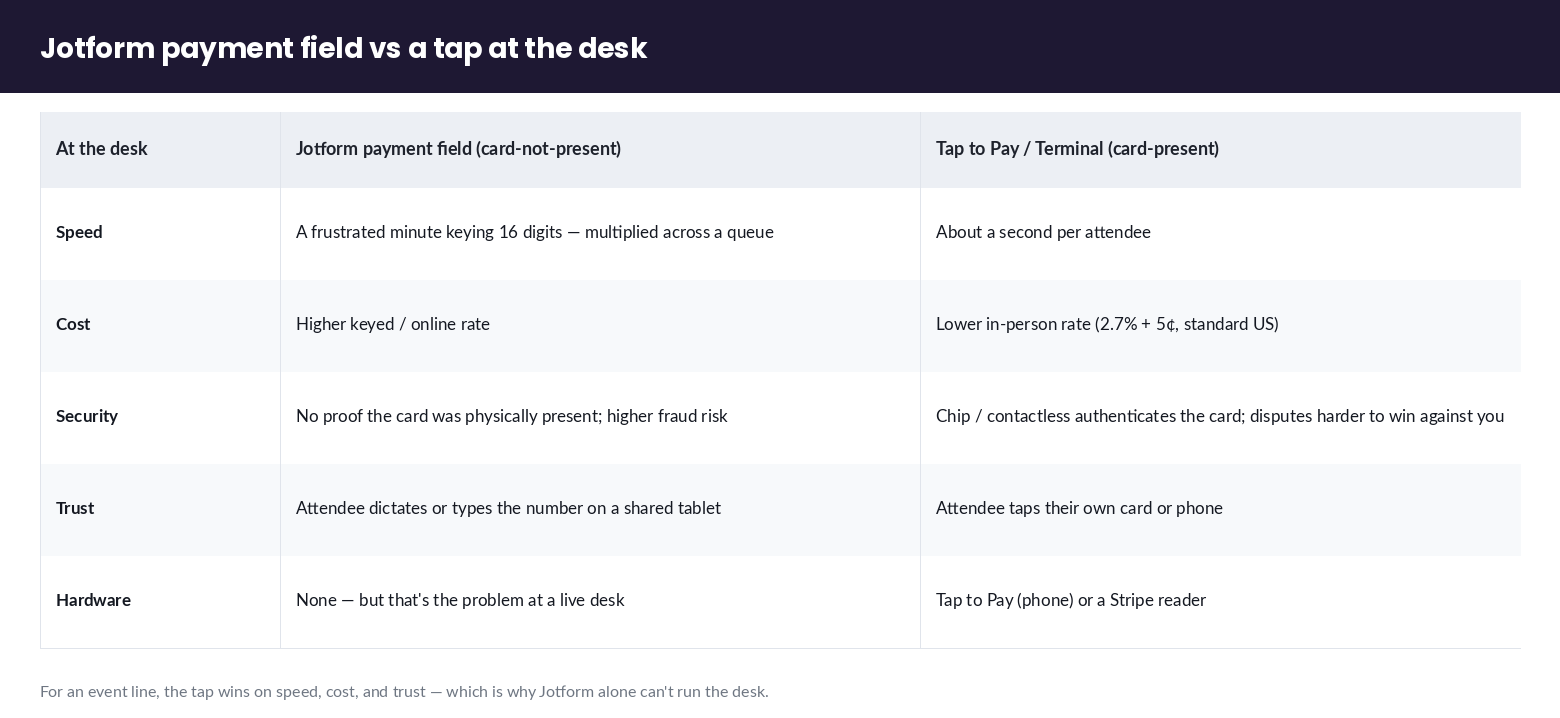
A Jotform payment field is a card-not-present transaction, and a tap at the desk is a card-present transaction — and Stripe treats them as genuinely different payments, priced differently and secured differently.
When a card number is keyed into a form (by the attendee or by a volunteer reading it off the card), Stripe sees a card-not-present charge: higher risk of fraud, higher processing rate, and no cryptographic proof the card was physically there. When an attendee taps their card or phone on a Stripe Tap to Pay device or a Terminal reader, Stripe sees a card-present charge: the chip or contactless interface authenticates the card, the rate is the lower in-person rate, and disputes are harder to win against you because the card was demonstrably present.
For an event desk, three practical consequences follow. First, speed: a tap takes about a second; typing a card number into a form takes a frustrated minute, and it multiplies across a queue. Second, cost: card-present pricing (2.7% + 5¢ on standard US in-person pricing) is typically cheaper than keyed-in online rates, and at event volume that gap adds up. Third, trust: attendees are far more comfortable tapping their own card on a reader than dictating the number to a volunteer or typing it into a shared tablet. This is the same online-vs-hardware distinction covered in the Tap to Pay on iPhone setup guide — worth reading if you’re deciding between a phone-based tap and a dedicated reader.
Reference architecture: Jotform registration + Tap to Pay / Stripe Terminal + a reconciliation bridge
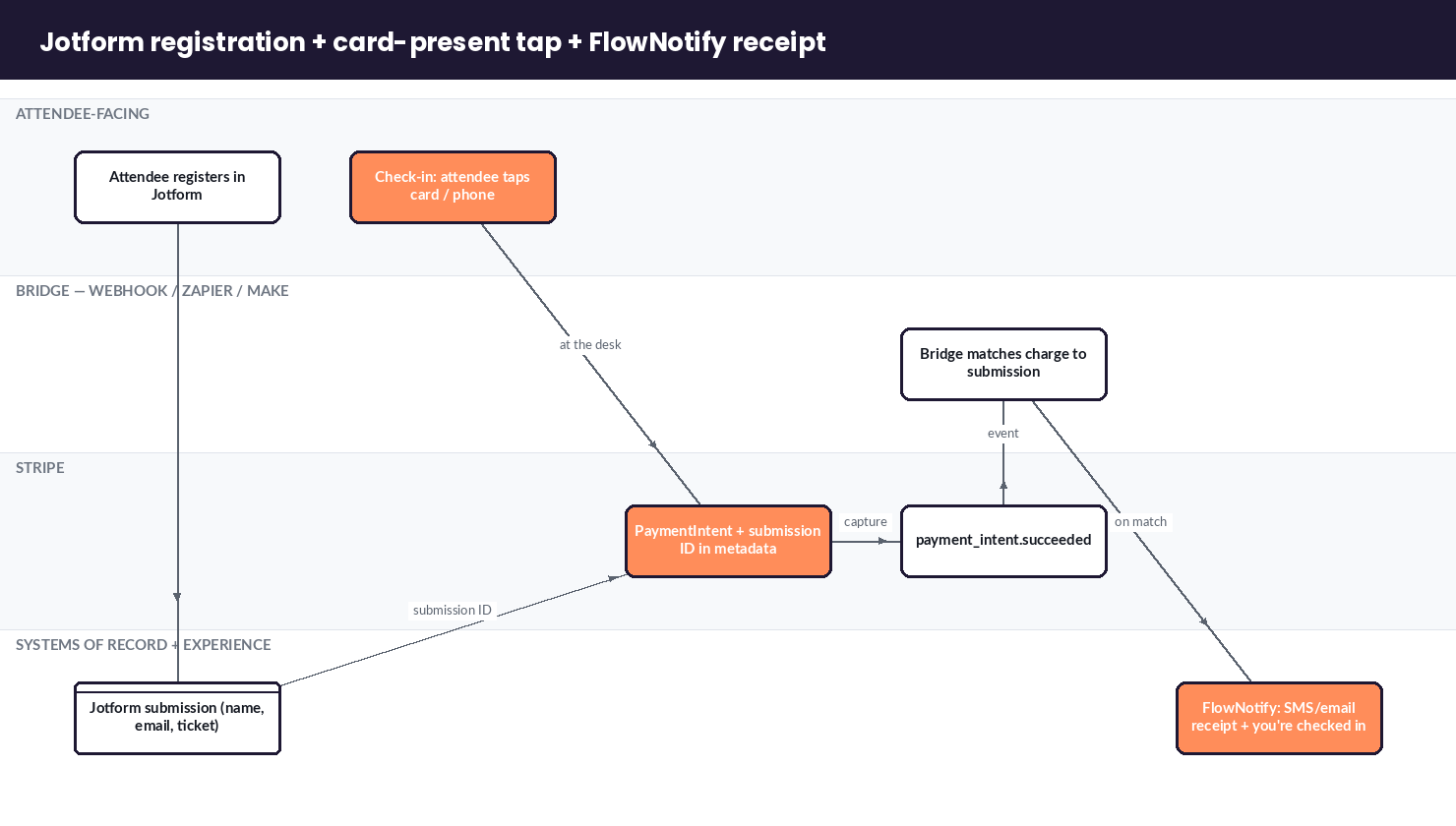
You run the two systems side by side and join them with a bridge: Jotform owns the registration, Stripe Terminal (or Tap to Pay) owns the card-present charge, a bridge matches the charge to the submission, and FlowNotify sends the receipt. Neither tool changes what it’s good at; the bridge is the small piece that makes them one workflow.
| Step | System | What happens | Why it’s here |
|---|---|---|---|
| 1. Register | Jotform | Attendee submits the registration form (name, email, ticket type) | Jotform is the source of truth for who’s attending |
| 2. Check in & tap | Stripe Tap to Pay / Terminal | Volunteer looks up the attendee; attendee taps card or phone | Card-present charge — fast, cheaper rate, authenticated |
| 3. Charge | Stripe PaymentIntent | Stripe captures the card-present payment with the submission ID in metadata | The charge carries the link back to the registration |
| 4. Reconcile | Bridge (webhook / Zapier / Make) | Match the Stripe charge to the Jotform submission by ID or email | Ties money to person — the piece competitors skip |
| 5. Confirm | FlowNotify | Fire the SMS/email receipt + “you’re checked in” confirmation | Completes the customer experience around the payment |
The only hardware decision is which card-present surface to use. Tap to Pay on a modern iPhone or Android phone needs no reader hardware at all — the phone is the reader, which is ideal for a pop-up desk, a fun run, or a fundraising gala where you don’t want to ship terminals. A dedicated Stripe reader (an M2 or WisePad 3 paired to a tablet, or an S700 all-in-one) makes sense for a permanent box office or a high-volume desk that runs all day. Either way the charge is card-present and the rest of the flow is identical.
How do you set up the Jotform-plus-card-present flow?
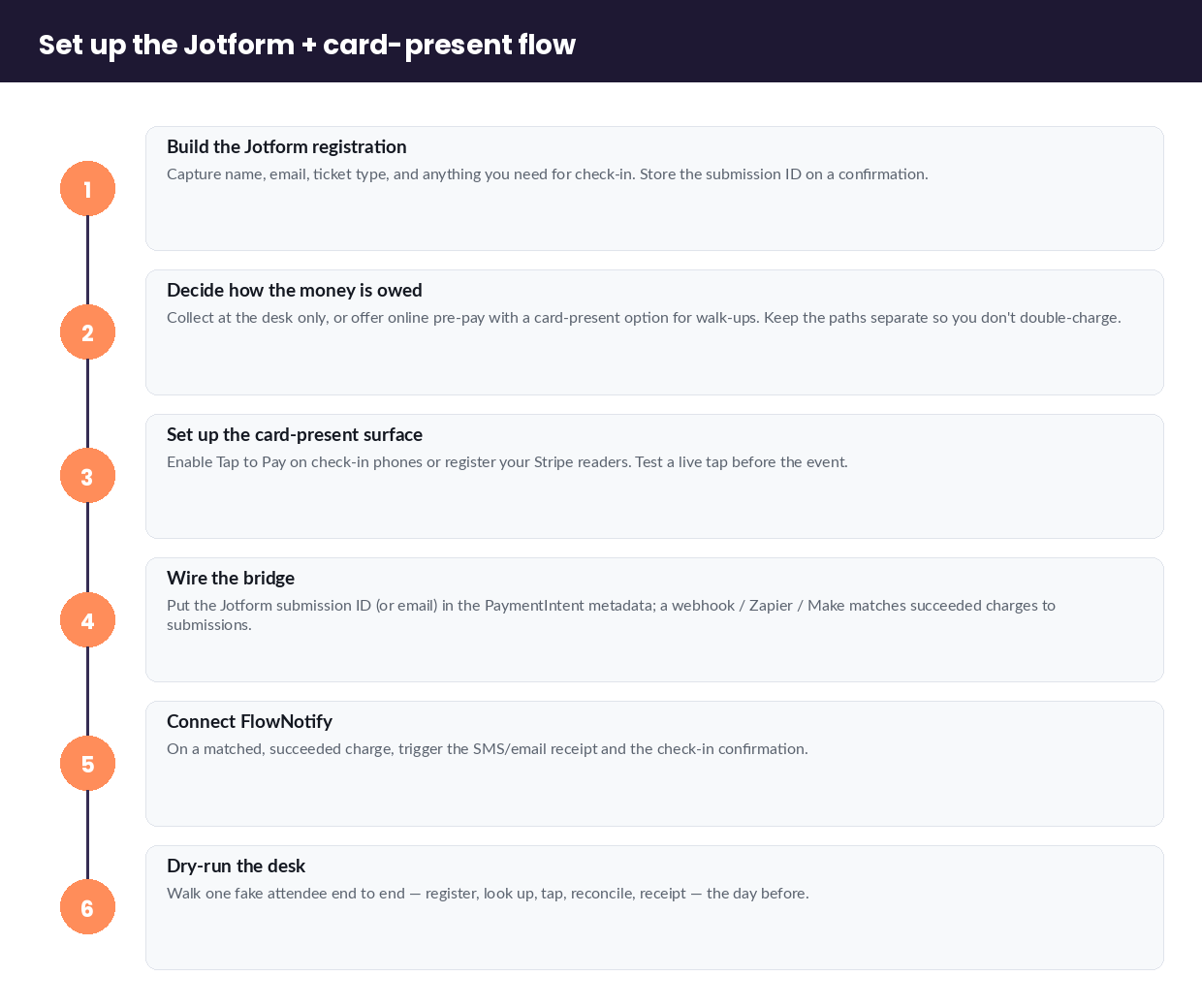
Here’s the setup as a procedure your team can follow before event day:
- Build the Jotform registration. Capture name, email, ticket/registration type, and anything you need for check-in. Turn on a confirmation that stores the submission ID.
- Decide how the money is owed. For paid registration, you can collect payment at the desk only (leave the Jotform payment field off and treat the form as pure registration), or offer online pre-payment on the form with a card-present option for walk-ups. Keep the two paths clearly separate so you don’t double-charge.
- Set up the card-present surface. Enable Stripe Tap to Pay on your check-in phones (setup guide) or register your Stripe readers. Test a live tap before the event.
- Wire the bridge. When you create the card-present PaymentIntent at the desk, put the Jotform submission ID (or the attendee email) in the PaymentIntent metadata. A Jotform webhook, Zapier, or Make scenario then matches Stripe’s
payment_intent.succeededevent back to the submission. - Connect FlowNotify. On a matched, succeeded charge, trigger FlowNotify to send the receipt and the check-in confirmation by SMS or email.
- Dry-run the desk. Walk one fake attendee end to end — register, look up, tap, reconcile, receipt — the day before, so a volunteer isn’t debugging at the door.
Event-desk realities: connectivity, walk-ups, line-busting, and refunds
The architecture is the easy part; the desk is where events actually break. Four realities to plan for that no form-integration tutorial mentions.
Venue connectivity. Convention centers, church halls, and outdoor venues have unreliable Wi-Fi and patchy cell service. Tap to Pay and internet readers need a connection to authorize a charge, so confirm coverage in the actual room, bring a hotspot as backup, and know which readers can queue offline. Test at the venue, not from your office.
Walk-ups vs pre-registered. Some attendees registered online days ago; some show up cold. Your desk needs both paths: look up a pre-registered attendee and take their tap, and create a brand-new registration plus tap on the spot for a walk-up. Line-bust by splitting these into two lanes when the queue builds.
Line-busting at peak. Doors-open is a spike. Multiple check-in phones running Tap to Pay, each minting its own charge with the submission ID in metadata, all reconciling to the same event, is how you keep a 200-person rush moving. The reconciliation bridge doesn’t care how many desks are running as long as each charge carries its attendee link.
Refunds and no-shows. People cancel, double-pay, or don’t show. Because the card-present charge is a normal Stripe PaymentIntent, you refund it from the Stripe dashboard like any other payment — and you can have FlowNotify send the cancellation/refund confirmation too, so the attendee isn’t left wondering. Decide your no-show and refund policy before the event and script the message once.
Tying the charge to the registration: webhooks and matching by submission ID or email
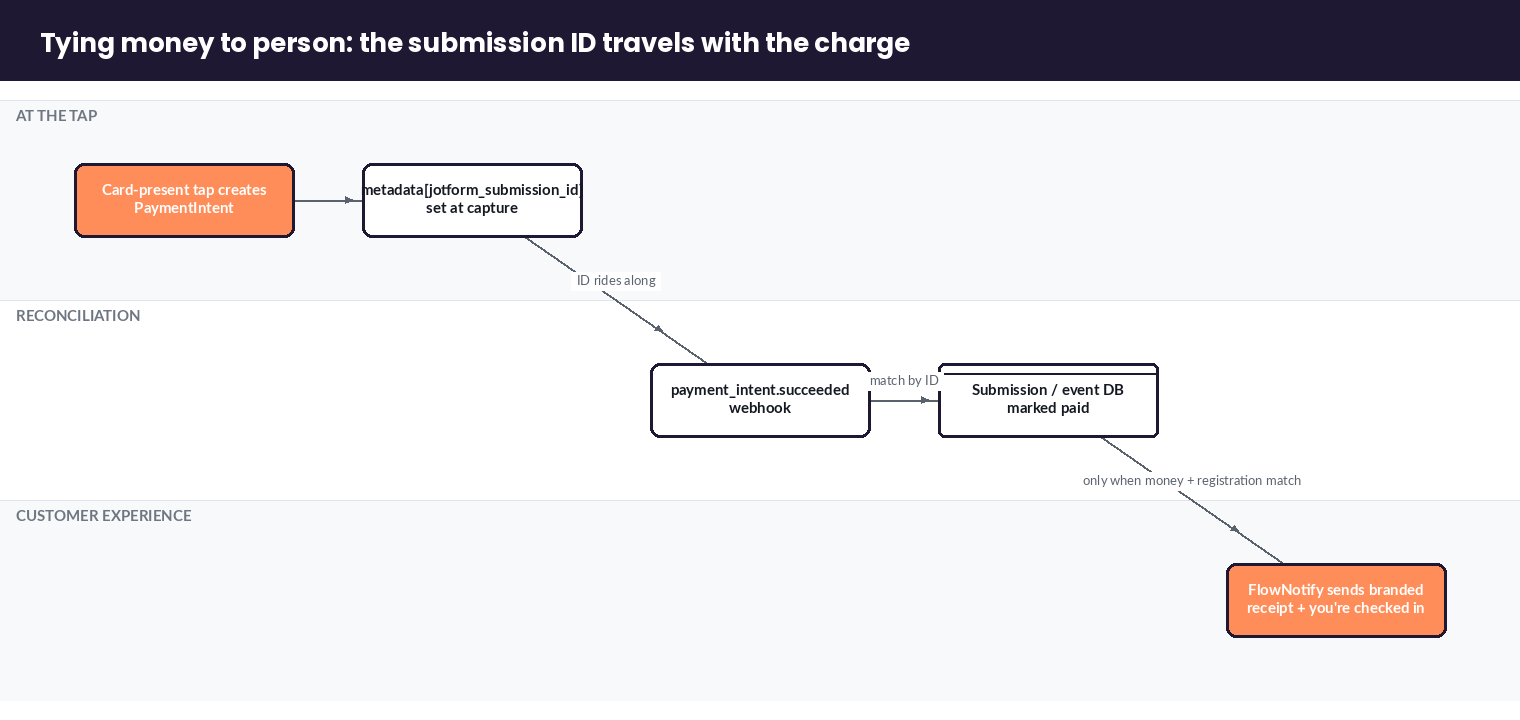
You connect the money to the person by carrying an identifier across both systems: put the Jotform submission ID (or attendee email) in the Stripe PaymentIntent metadata at the desk, then use a webhook to match Stripe’s succeeded charge back to the submission. This reconciliation step is the whole game — it’s what turns “we took some taps” into “we know exactly who paid for what.”
There are two clean ways to match. The robust way is by submission ID: when you create the card-present PaymentIntent, set metadata[jotform_submission_id] to the ID your check-in app pulled from Jotform. Stripe fires payment_intent.succeeded, your bridge reads the submission ID from metadata, and updates that exact Jotform submission (or your own event database) as paid. The simpler way is by email: match the charge’s receipt email to the registration email — easier to wire but ambiguous if one person registers several people, so prefer submission ID when you can. Jotform’s webhooks and developer docs cover receiving the submission and pushing updates back; on the Stripe side you’re listening for the standard PaymentIntent events.
The tools in the middle are a choice, not a requirement: a direct webhook you host, a no-code Zapier zap, or a Make scenario all work. The design constraint is the same regardless — the identifier must travel with the charge from the moment of the tap, because you can’t reliably reconstruct it afterward.
Sending the receipt: FlowNotify SMS/email confirmation on card-present capture
The moment the card-present charge succeeds, FlowNotify sends the attendee a receipt and a check-in confirmation — the piece that turns a payment into a finished experience. Stripe can email a basic receipt; FlowNotify sends the event’s receipt: branded, by SMS or email, carrying the confirmation the attendee actually cares about (“You’re checked in — Booth 14 opens at 6pm”).
This is FlowNotify’s reason to be in the stack. A payment confirmation at an event is not an accounting artifact; it’s a customer-experience moment — proof the attendee is in, a record they can show at the door, and a channel you can layer event logistics onto. Because the trigger is the reconciled, succeeded card-present charge, the message goes out only when money and registration actually match, so nobody gets a “you’re in” text who hasn’t paid. The same pattern powers electronic receipts across the estate — see FlowNotify electronic receipts for Stripe Terminal and the broader events cluster for donor receipts and multi-day event confirmations.
Frequently asked questions
Can Jotform process in-person / card-present payments?
Not by itself. Jotform’s Stripe payment field is online only — the card number is typed in, or you pre-authorize a card to charge later. To take a genuine card-present tap at an event, pair Jotform registration with Stripe Tap to Pay or a Stripe Terminal reader and reconcile the charge back to the Jotform submission.
Can you use a card reader with a Jotform payment form?
No — you can’t connect a physical card reader directly to a Jotform payment field. Jotform’s own support confirms this. The workaround is to run the card-present charge through Stripe Terminal or Tap to Pay separately and link it to the Jotform submission with a reconciliation bridge (webhook, Zapier, or Make).
How do you take payments at an event registration desk?
Register attendees in Jotform, then take the payment as a card-present tap on Stripe Tap to Pay or a Terminal reader at check-in, carrying the Jotform submission ID in the PaymentIntent metadata. A webhook matches the succeeded charge to the registration, and FlowNotify sends the receipt and confirmation.
Can I use Tap to Pay for event check-in?
Yes — Tap to Pay on a modern iPhone or Android phone turns the phone into the card reader, so you can take a contactless tap at a check-in desk with no extra hardware. It’s ideal for pop-up desks, galas, and fun runs; a dedicated reader suits a permanent, high-volume box office.
How do you send a receipt after an in-person event payment?
Trigger it on the reconciled, succeeded card-present charge. FlowNotify sends a branded SMS or email receipt plus the event confirmation the moment the payment and registration match, so the attendee gets a real receipt and a “you’re checked in” message — not just a bare Stripe email.
What’s the difference between authorizing a card on a form and tapping it in person?
Authorizing or typing a card on a form is a card-not-present transaction: higher rate, higher fraud risk, slower at a busy desk. Tapping in person is a card-present transaction: lower in-person rate, cryptographically authenticated, and about a second per attendee. For an event line, the tap wins on speed, cost, and trust.
Running an event and want attendees to tap at the desk — registration in Jotform, a card-present charge in Stripe, and a receipt that actually says “you’re checked in”? Book an event consult with our team. We’ll map your registration-to-tap-to-receipt flow, including venue connectivity and walk-up handling, before your doors open.
