
Notification Strategy, WooCommerce Notifications
WooCommerce SMS vs Email Notifications: Which Channel Drives Better Results?
Apr
Last updated April 2026. All data and plugin references tested with the latest version of WooCommerce and verified for HPOS compatibility.
Your WooCommerce store just shipped an order, but the customer never saw the confirmation email — it landed in a promotions tab, got buried under newsletters, or went straight to spam. Now they’re contacting support asking where their order is. This scenario plays out thousands of times a day across eCommerce stores, costing time, money, and customer trust. Choosing the right notification channel — SMS, email, or both — directly impacts how many customers actually see your messages, engage with your store, and come back for more.
WooCommerce SMS vs email notifications is not a simple either-or decision. Each channel has distinct strengths depending on the message type, urgency, and customer preference. In this guide, we break down the real performance data, compare costs, and show you exactly how to build a multi-channel notification strategy that maximizes both reach and ROI for your WooCommerce store.
SMS Open Rates vs Email: What the Data Actually Shows
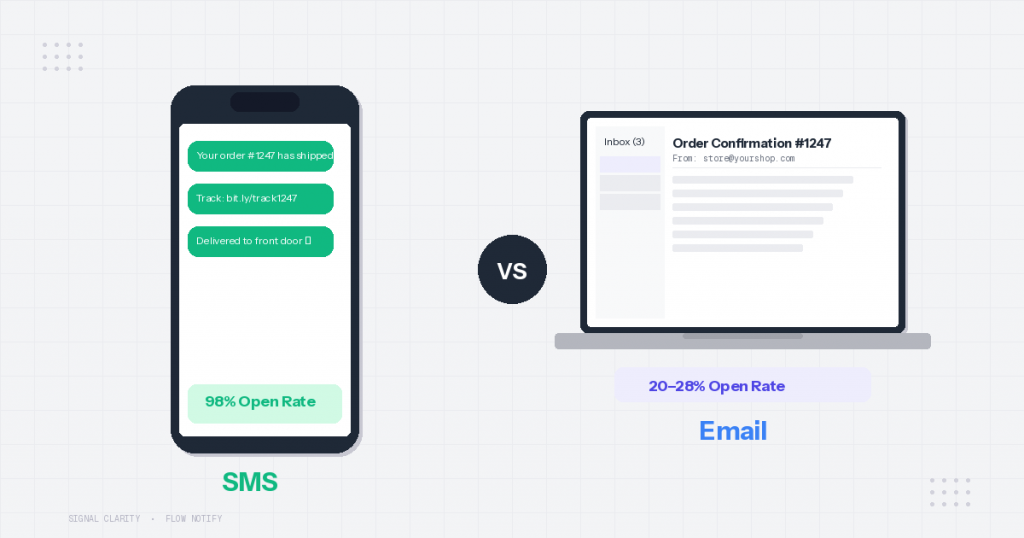
The gap between SMS and email engagement is not subtle — it is dramatic. According to industry data from 2025–2026, SMS messages achieve open rates between 90% and 98%, while marketing emails average 20–28% open rates. That means for every 100 order notifications you send via email, roughly 70–80 of your customers may never read them. Send the same message via SMS, and 90 or more will see it.
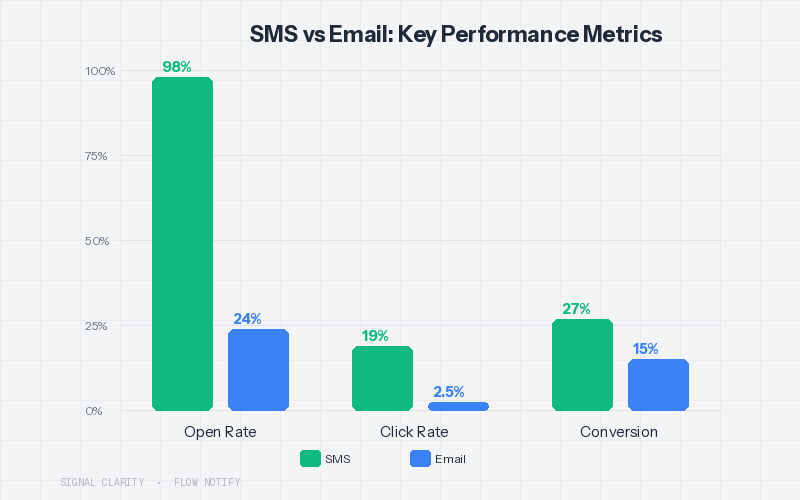
Response time tells an even more compelling story. Approximately 90% of SMS messages are read within three minutes of delivery, compared to email where the average time-to-open stretches to several hours — if the recipient opens it at all. For time-sensitive WooCommerce notifications like shipping confirmations, delivery alerts, or pickup-ready messages, that speed gap matters.
Here is how the two channels compare across key performance metrics:
| Metric | SMS | |
|---|---|---|
| Open Rate | 90–98% | 20–28% |
| Click-Through Rate | ~19% | ~2.5% |
| Conversion Rate | 21–32% | ~15% |
| Average Time to Open | Under 3 minutes | Several hours |
| Average ROI | $21–$71 per $1 spent | $10–$36 per $1 spent |
| Spam/Filter Risk | Very low | Moderate to high |
| Content Capacity | 160 characters (standard) | Unlimited (with images, links, formatting) |
The takeaway is clear: if your goal is ensuring customers actually see your notification, SMS wins by a wide margin. But raw open rates do not tell the complete story — cost, content flexibility, and message type all play a role in determining which channel is right for each notification.
Which Channel Works Best for WooCommerce Order Updates
Not every WooCommerce notification is created equal. A shipping confirmation has different urgency than a promotional upsell, and a payment receipt serves a different purpose than a back-in-stock alert. The right channel depends on the message.
Use SMS for high-urgency, time-sensitive notifications: order confirmations, shipping updates, delivery alerts, pickup-ready messages, payment reminders, and two-factor authentication codes. These are messages where speed matters and the content is brief. A customer waiting for their curbside pickup order needs to know the moment it is ready — an email they might check in two hours does not solve that problem.
Use email for detailed, reference-oriented notifications: order receipts with full line-item details, digital download links, return policy information, detailed shipping manifests, and marketing content with images and branding. Email gives you unlimited space to include product images, tracking links, recommended products, and rich formatting that SMS simply cannot deliver.
Use both channels together for critical lifecycle moments: abandoned cart recovery, subscription renewal reminders, and high-value order confirmations. According to industry research, brands that combine SMS and email see up to 47% higher customer retention than those relying on a single channel.
Quick decision framework: If the customer needs to act within minutes, send SMS. If the customer needs to reference the message later, send email. If the message is critical to revenue (cart recovery, renewal), send both.
The True Cost of SMS vs Email for WooCommerce Stores
One of the biggest misconceptions in the SMS vs email debate is that SMS is prohibitively expensive. In reality, the cost comparison depends entirely on your volume, your audience location, and which metrics you optimize for.
Email is cheaper on a per-message basis — most WooCommerce email solutions cost between $0 (for built-in WooCommerce emails) and $0.001–$0.01 per message through services like Mailchimp or SendGrid. SMS typically costs $0.01–$0.05 per message in the US through providers like Twilio, with international rates varying significantly.
However, cost-per-message is a misleading metric when SMS delivers 7–8x the open rate and 2x the conversion rate. Consider this example: if you send 1,000 abandoned cart emails at $0.005 each ($5 total) with a 25% open rate and 2% conversion rate, you recover 5 carts. If you send 1,000 abandoned cart SMS messages at $0.03 each ($30 total) with a 95% open rate and a conservative 10% conversion rate, you recover 100 carts. At an average order value of $50, the email approach recovers $250 for $5 spent, while SMS recovers $5,000 for $30 spent — a dramatically better return.
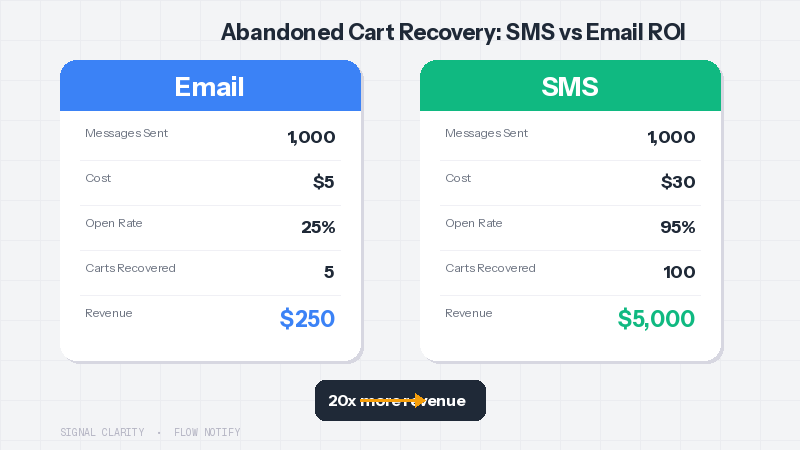
The real cost question for WooCommerce merchants is not “which channel is cheaper per message” but “which channel delivers more revenue per dollar spent.” For transactional and recovery notifications, SMS almost always wins. For ongoing nurture and content-heavy communication, email remains the more cost-effective choice.
Building a WooCommerce Multi-Channel Notification Strategy
The highest-performing WooCommerce stores in 2026 do not choose between SMS and email — they use both strategically. A well-designed multi-channel strategy sends the right message on the right channel at the right time, based on the notification type and the customer’s communication preferences.
Here is a practical multi-channel notification framework for WooCommerce:
| Notification Type | Primary Channel | Secondary Channel | Why |
|---|---|---|---|
| Order Confirmation | SMS | Email for full receipt; SMS for instant reassurance | |
| Shipping Update | SMS | Customers want real-time tracking alerts | |
| Delivery Confirmation | SMS | — | Brief, urgent — SMS is sufficient |
| Pickup Ready | SMS | — | Time-critical; customer needs to act immediately |
| Abandoned Cart Recovery | SMS | SMS first for urgency; email follow-up with product images | |
| Back-in-Stock Alert | SMS | Speed matters — stock may sell out again quickly | |
| Review Request | SMS | Less urgent; email provides space for review link and context | |
| Refund Processed | SMS | Customer needs a reference-worthy receipt; SMS confirms it quickly | |
| Promotional / Sale | SMS (opt-in only) | Email for rich visuals; SMS for flash sales or limited-time offers |
The key to executing this strategy is having a single platform that handles SMS, email, and WhatsApp without requiring you to juggle multiple plugins, dashboards, and billing accounts. That is where the right WooCommerce notification plugin becomes critical.
How FlowNotify Handles SMS, Email, and WhatsApp from One Dashboard
Best for: WooCommerce merchants who want unified SMS, WhatsApp, and email notifications managed from a single dashboard — without installing separate plugins for each channel.
FlowNotify stands out as the most complete multi-channel notification solution for WooCommerce because it consolidates SMS, WhatsApp, and email into one unified interface. Instead of configuring Twilio in one plugin, email templates in another, and WhatsApp through a third-party service, you manage everything from a single dashboard inside your WooCommerce admin.
Here is what makes FlowNotify particularly well-suited for a multi-channel strategy:
Unified channel management. Configure SMS (via Twilio integration), WhatsApp (via Meta WhatsApp Cloud API), and email notifications all from the same settings panel. One plugin, one dashboard, one workflow.
25+ data field personalization. Every message — whether SMS, email, or WhatsApp — can be dynamically personalized with over 25 data fields including customer name, order number, order total, product names, tracking numbers, custom order statuses, and more. Personalized messages consistently outperform generic templates.
Custom order status triggers. Create custom WooCommerce order statuses with unique labels, icons, and colors, then attach automated notifications to each status change. This is especially valuable for stores with specialized fulfillment workflows — for example, a restaurant with “Preparing,” “Ready for Pickup,” and “Out for Delivery” statuses that each trigger a different SMS.
Flexible trigger system. Notifications can fire on order status changes, customer opt-in events, account creation, order payment, new reviews, and more. You can also send one-off triggered notifications for promotions and special events.
Stock and sale notifications. Automate back-in-stock and out-of-stock alerts so customers are notified the moment a product they want becomes available — via their preferred channel.
HPOS compatible. FlowNotify is fully compatible with WooCommerce High-Performance Order Storage, ensuring it works with the latest WooCommerce infrastructure updates.
Pricing starts at just $7.42 per month (billed annually at $89/year), and FlowNotify offers a 7-day free trial so you can test the full multi-channel setup before committing. For comparison, most stores end up paying $30–$60+ per month when stacking separate SMS, email, and WhatsApp plugins.
SMS vs Email Compliance: What WooCommerce Merchants Need to Know
Both SMS and email notifications come with regulatory requirements, but SMS regulations are stricter and the penalties for non-compliance are more severe.
For SMS in the United States, the Telephone Consumer Protection Act (TCPA) requires express written consent before sending marketing text messages. Transactional SMS — order confirmations, shipping updates, delivery alerts — generally does not require the same level of opt-in, but it is best practice to collect consent for all message types. Violations can result in fines of $500–$1,500 per unsolicited message.
For email, the CAN-SPAM Act requires a clear unsubscribe mechanism, accurate sender information, and honest subject lines. The rules are more permissive for transactional emails, which can be sent without prior opt-in as long as they relate to an existing transaction.
If you sell to customers in the EU or UK, GDPR applies to both channels and requires explicit opt-in consent for marketing communications.
The practical implication for your WooCommerce store: always include an opt-in checkbox during checkout for SMS marketing messages, keep transactional and promotional messages clearly separated, and maintain unsubscribe mechanisms on both channels. FlowNotify supports customer opt-in workflows, making it easier to stay compliant as you scale your notification strategy across channels.
When to Use WhatsApp as a Third Channel
WhatsApp is quickly emerging as a powerful middle ground between SMS and email for WooCommerce notifications. With over 2 billion active users globally, WhatsApp offers the immediacy of SMS combined with the rich media capabilities of email — including images, documents, buttons, and formatted text.
WhatsApp is particularly effective for WooCommerce stores that serve international customers, especially in regions like Latin America, Europe, the Middle East, and Southeast Asia where WhatsApp is the dominant messaging platform. In these markets, WhatsApp messages can achieve open rates comparable to SMS at a fraction of the per-message cost.
Common WooCommerce use cases for WhatsApp include order confirmations with product images, shipping updates with clickable tracking links, customer support conversations that start from an order notification, and promotional messages with rich media catalogs. FlowNotify’s integration with the Meta WhatsApp Cloud API makes adding WhatsApp to your notification mix straightforward — it is managed from the same dashboard as your SMS and email notifications.
For a deeper look at getting WhatsApp set up for your store, see our guide on WooCommerce WhatsApp order notifications.
Choosing the Right Channel Mix for Your Store
There is no universal “right answer” to the WooCommerce SMS vs email notifications debate. The best approach depends on your specific business model, customer base, and notification needs. Here are three practical scenarios:
If you run a local business with pickup or delivery (restaurant, coffee shop, salon): prioritize SMS heavily. Your customers need real-time alerts — “Your order is ready” or “Your stylist is ready for you” — and they need them on their phone immediately. Email is secondary for receipts and follow-up marketing.
If you run a standard eCommerce store shipping physical products: use a balanced mix. Send order confirmations via email (with an SMS summary), shipping and delivery updates via SMS, and abandoned cart recovery through both channels. This approach captures the engagement benefits of SMS while keeping email for detailed reference messages.
If you sell internationally: add WhatsApp to your channel mix. In many markets outside North America, WhatsApp reaches customers more reliably than SMS and at lower cost. FlowNotify supports all three channels from one dashboard.
Whichever mix you choose, the most important thing is to actually reach your customers with the messages they need. According to the data, stores relying solely on email notifications are leaving money on the table — nearly half of their messages may never be seen. Adding SMS to your WooCommerce notification stack is one of the highest-ROI investments you can make.
Get Started with Multi-Channel WooCommerce Notifications
Building a multi-channel notification strategy does not need to be complicated. With FlowNotify, you can set up SMS, WhatsApp, and email notifications from a single WooCommerce dashboard in minutes — no separate plugins, no juggling multiple provider accounts.
Start your 7-day free trial to test the full multi-channel experience, with pricing starting at just $7.42/month (billed annually at $89/year). See how your open rates, customer satisfaction, and repeat purchase rates improve when your notifications actually reach the people they are meant for.
For a detailed comparison of the top WooCommerce notification plugins and how they handle multi-channel messaging, check out our Best WooCommerce Notification Plugins Compared (2026) guide.
